Running a business often means living in your inbox — chasing leads, confirming orders, sending quotes, promoting products. The key is making that time work for you, not the other way around.
Professional Email Powered by Titan is built to do exactly that. It’s a fresh, modern platform with powerful AI that can turn your rough ideas into on-brand communications in seconds.
You’ll of course get a custom email address (@your-big-idea.co.uk) to build your brand and credibility online. So much more than that, you’ll get access to smarter inbox features to prioritise what matters and turn conversations into customers.
Why you’ll love Professional Email Powered by Titan
Let’s be honest: traditional email hasn’t always felt like it was on your side. If you’ve ever sent a quote from a free address, dug through endless threads to find one message, or hesitated to reply because you weren’t sure how to phrase it, you’ll know the feeling.
Your inbox should be more than a message holder. It should help you stay organised, communicate clearly, and build your brand as you work.
Professional Email Powered by Titan replaces our previous email service with one designed for how modern businesses really work. It turns everyday emailing into something simpler, smarter, and more productive.
Watch how Professional Email Powered by Titan changes business email:
Ready to see what it can do for your business? Explore Professional Email plans
Why a professional email address matters
First impressions count — especially online.
Free email addresses? They might seem fine at first. But over time, they quietly chip away at your credibility. A custom email address looks professional and tells customers you’re serious about what you do. It builds trust from the very first message.
Titan combines that instant credibility with practical tools that make everyday emailing faster and more intuitive. And with the mobile app, you can manage it all from anywhere.
See also: Why Every Business Needs a Professional Email Address

You start it, we’ll finish it: Introducing Smart Write AI
Some emails just write themselves. For the rest, Smart Write AI helps you create professional, on-brand messages in seconds.
Here’s how to use it three steps:
1. Start from Scratch
Turn half-written notes, rough ideas, or quick prompts into brand‑ready emails instantly. Whether you’re drafting a new message, proposal, or announcement, the AI builds a complete, well‑structured draft that’s ready to review and send.
Pick your tone (Professional, Friendly, or Casual), set the length, and make quick edits before sending.
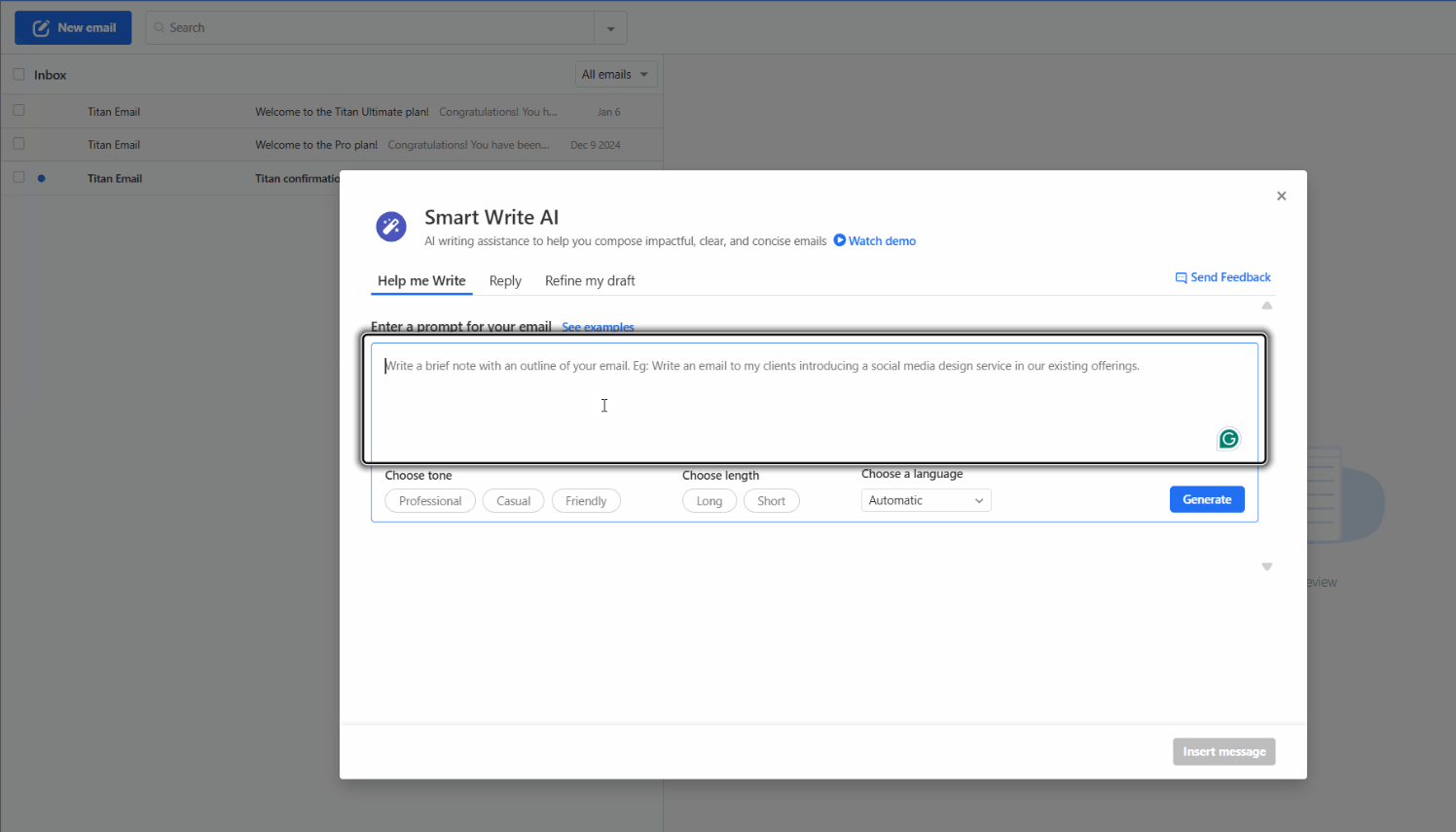
On desktop: Click New Email, then the wand icon, type your prompt, select tone, length, and language, and click Generate.
On mobile (iOS/Android): Tap New Email, tap the wand icon, choose tone and length under Writing Style, then tap Generate.
2. Reply to an Email
Smart Write can also create professional responses based on the message you’ve received.
Let the AI handle responses too. It analyses the original message and composes a reply that feels natural, relevant, and consistent with your brand voice. Perfect for teams sharing an inbox.
Click the lightbulb icon to see example prompts. You can also switch languages.
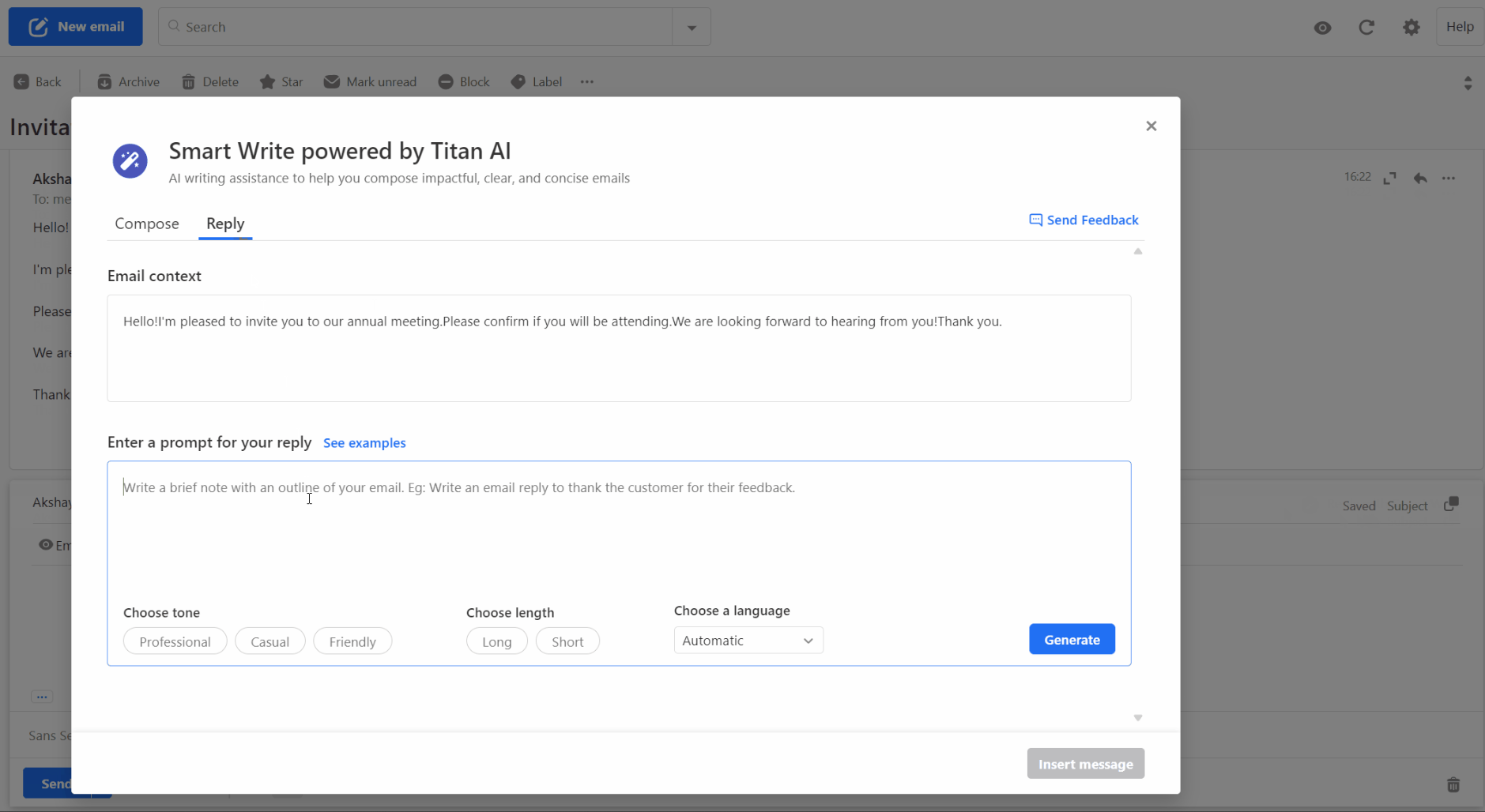
On desktop: Click Reply with Smart Write at the bottom of the email. Add your prompt, select tone and length, then click Generate. Insert the reply when ready.
On mobile (iOS/Android): Open the email, tap Reply with Smart Write, add your prompt, select tone and length, then Generate and insert.
3. Refine My Draft
Already started an email? Smart Write can help you finish strong. It polishes tone, fixes grammar, tightens phrasing, and fills in missing details — all while keeping your original message intact.
This works really when for finalising quotes, proposals, or really any half-written message before hitting send.
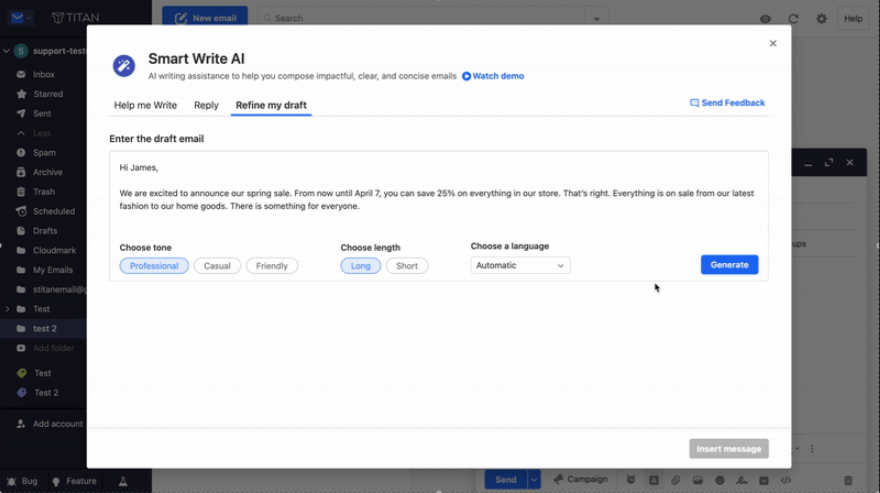
On desktop or mobile: Open your draft. Then, tap or click the wand icon, enter your prompt (e.g., “make this more professional”), select tone, length, and language, then Generate. Regenerate as needed!
The right tools, right in your inbox
Professional Email powered by Titan isn’t just about AI — it’s about giving you the tools to run your business more efficiently every day. Depending on your plan, you’ll have access to powerful features that save time and keep you focused on customers.
Just a few standout features include:
☐ Priority Inbox: A feature that automatically highlights important emails, so you can spot customer messages quickly and keep less urgent ones out of the way.
☐ Send Later: Write messages whenever it suits you and schedule them to arrive at the perfect time, so every email lands just right.
☐ Read Receipts: See when your message’s been opened, so you’ll know exactly when it’s time to follow up.
☐ Follow-up Reminders: Get a gentle nudge if there’s no reply, helping you stay on top of every opportunity.
☐ Email Templates: Save your best responses for next time, so you can reply faster and keep your tone consistent.
☐ Signature Builder: Create on‑brand signatures that sync across devices, which keeps your business looking professional everywhere.
☐ Appointment Booking: Let customers book time with you directly, so scheduling time is quick and easy.
☐ Email Campaigns: Send updates and announcements to your contacts from the same place you manage your inbox, which lets you stay connected without switching tools.
And that’s just a taste of what’s possible. We’ll be sharing more soon — including deep dives into Titan’s built-in campaigns, signatures, and other ways to make your email work harder for your business.

Ready to Get Started?
Professional Email Powered by Titan starts from affordable plans that fit businesses just like yours. Pick your plan, connect your domain, and you can be up and running with your own business email today.
How to get started:
1. Choose your plan.
Pro Light includes 10GB of storage and all the core tools to get up and running. Need more room or extra productivity features? Move up a plan any time. Compare all plans to see which suits you.
2. Connect your domain.
You can buy a new domain to your plan when checking out, or connect an existing domain. Once it’s connected, you can start using your custom email address straight away.
3. Try the essentials.
Why not send yourself a test email? Explore Smart Write and see how professional — and easy — your inbox feels. Make your inbox work for you.
Wrap up
Professional Email Powered by Titan brings together AI writing tools and a custom email address that matches your domain. It’s built to help you reply faster, stay organised and look professional every time you hit send. From just £1.99/mo first year — get started in minutes.

For more on how AI is changing the way we work, check out: 2026 Business Trends and Tips Every Owner Should Know
FAQ
What is Professional Email powered by Titan?
Professional Email powered by Titan is a business email service that lets you create a custom address like hello@yourbusiness.com. It also includes smart inbox tools and built-in AI writing features to help you draft, reply and manage emails more easily.
Can I use my existing domain name?
Yes. You can connect a domain you already own or buy a new one when you sign up. Once connected, you can start sending and receiving emails from your custom address straight away.
What is Smart Write and how does it work?
Smart Write is Titan’s built-in AI writing assistant. It helps you write new emails, reply to messages and refine drafts you’ve already started. You choose the tone and length, review the draft, then edit before sending.
Can I access my email on mobile?
Yes. You can use Professional Email powered by Titan on desktop or through the Titan mobile app for iOS and Android. That means you can manage your inbox whether you’re at your desk or out and about.
Can I create multiple email addresses?
Yes. Depending on your plan, you can create multiple mailboxes or shared inboxes. You can also set up additional addresses like info@, sales@ or contact@ to help organise your emails.
Is Professional Email powered by Titan good for teams?
Yes! Get a mailbox for each team member (priced per user), then higher-tier plans unlock shared inboxes and collaboration features to manage customer enquiries, quotes, and support requests together.