
Getting your business found online now means showing up twice: both in traditional search results and in the answers given by AI search assistants.
More than ever it’s AI doing the searching on behalf of your customers — scanning the web, comparing options, prices, then handing them back the recommendation.
Fortunately, you don’t need two separate strategies to keep up. Strong SEO foundations keep your content discoverable, and a few extra tweaks make it easier for AI to understand and pick.
We’ll walk you through it step by step, starting with the fundamentals that still matter, then adding simple layers of AI-friendly structure and trust signals so both Google AI Mode and other assistants know exactly when to show your content to the right people.
Key takeaways
- ☑︎ Structure for AI scanning: Break your content into headings, short paragraphs, bullet points, and tables so both readers and AI can find answers fast.
- ☑︎ Guide AI with summaries and FAQs: Context cues, TL;DRs, and question-answer sections make answers easier for AI to extract.
- ☑︎ Use topic clusters: Link main topic pages (“pillar pages”) and related articles to show depth on a topic.
- ☑︎ Show your expertise: Build authority with author bios, case studies, reviews, and credible sources.
- ☑︎ Remember SEO basics: Keep your pages clearly titled, easy to navigate, with the right keywords — these things still matter for Generative Engine Optimisation (GEO).
The Shift: From search rank to AI picks
For most of the internet’s history, winning online meant one thing: ranking at the top of search. The higher you appeared on the search engine results page (SERP), the more traffic and business came your way.
AI tools like ChatGPT, Perplexity, and Google AI Overviews are completely changing that. They scan the web, select the clearest and most trustworthy answers, and deliver them directly to users — often without any human ever clicking through to your site.
Yet ironically, it means businesses still need a domain name and a great website with clear, well-structured pages for AI to pull from.
What the AI chooses may not be the top-ranked pages either. Instead, it often prioritises content that’s authoritative, clearly organised, and simple for AI to “parse” and break down into small, understandable pieces.
Why this changes everything
This shift moves the focus beyond chasing SEO rankings. Now it’s about Generative Engine Optimisation (GEO): content that AI tools seek out, cite, and surface directly to users.
In the sections ahead, we’ll break down what really makes the difference. Broadly that’s:
☐ Putting audience needs first by writing clearly and answering real questions your customers are asking.
☐ Structuring your content so AI can scan it and then easily surface your answers.
☐ Showing your expertise and building trust with E-E-A-T (Experience, Expertise, Authoritativeness, Trustworthiness).
Google’s AI Mode – what you need to know
What is Google’s AI Mode?
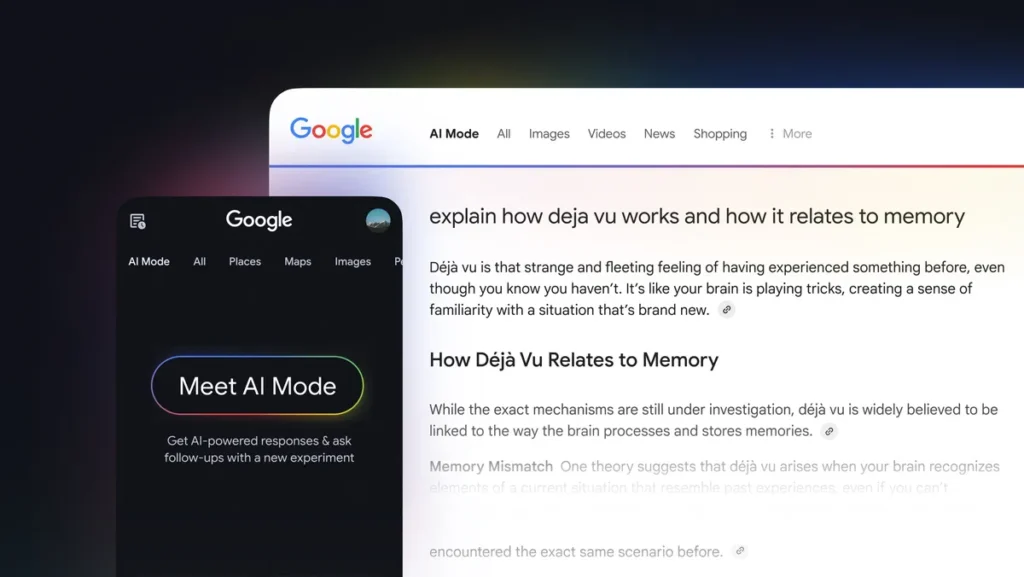
Google’s AI Mode gives you a full, chat‑style answer at the top of search results before the usual listings. It’s powered by Gemini, builds on AI Overviews, appears on certain queries (especially on mobile), and started rolling out to UK users after AI Overviews launched in 2024.
Why does Google AI Mode matter?
It shifts attention to the AI answer at the top of the page, which can change clicks, traffic, and brand visibility compared with traditional listings.
How does Google AI Mode work?
Google reads multiple pages, pulls out key points, and generates one short conversational answer. It also often shows a few links and sources underneath.
Why is Google AI Mode important for business and website owners?
The way customers find information is changing, with AI delivering direct answers instead of search result lists. It’s important to businesses because your site can appear right inside those AI answers.
How do I get my business to show on Google AI Mode?
The main thing is to create clear, trustworthy content that AI can easily understand and recommend. SEO basics still count — more on all this coming up later in our guide.
For more, check out: How to Get Your Business Seen in Google AI Mode
SEO vs GEO: What’s the difference?
What is SEO?
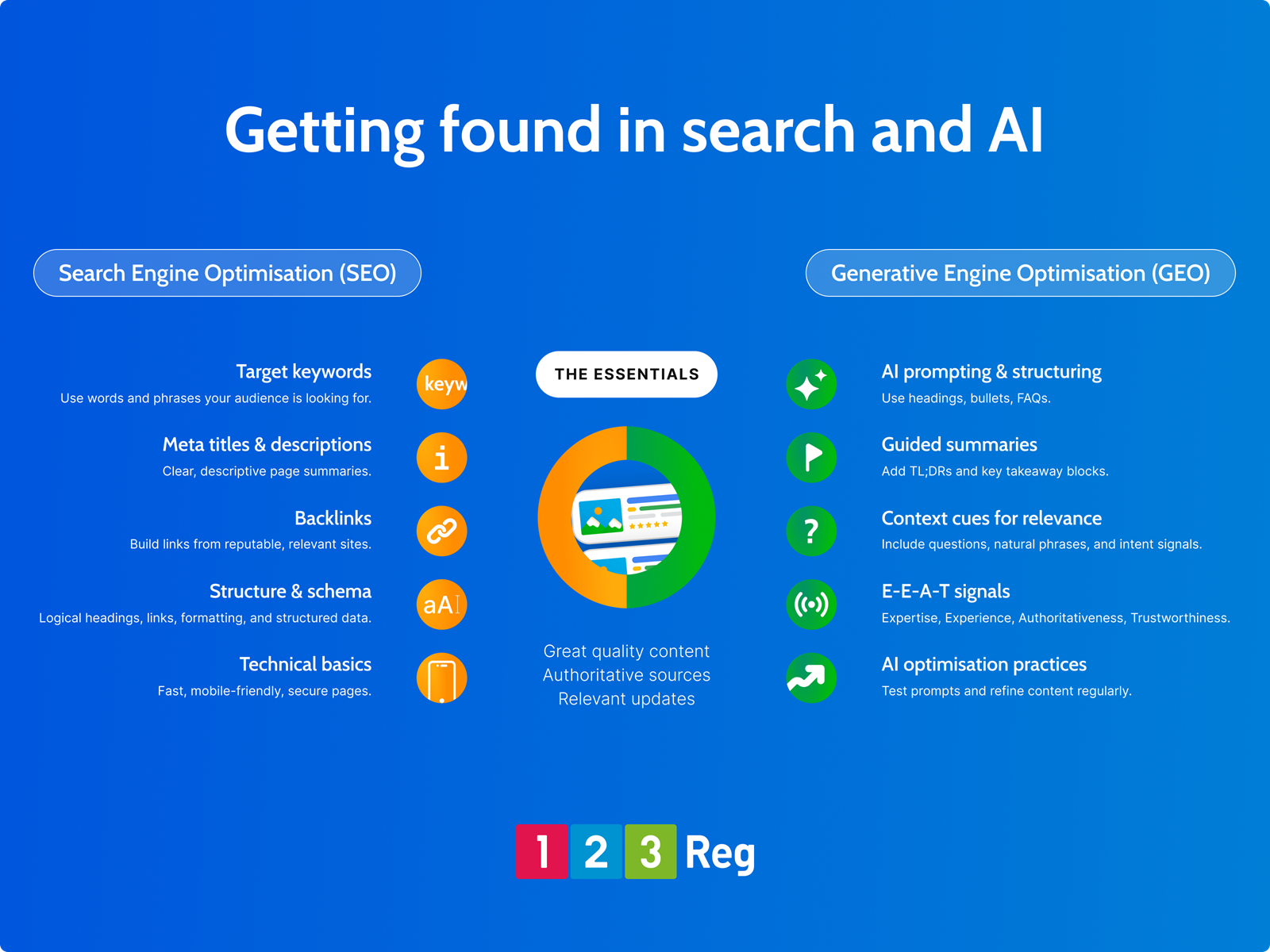
Search Engine Optimisation (SEO) helps search engines understand, trust, and show your pages when people search.
It starts with clear page structure so both people and search engines get your content, plus natural keywords, fast loading, mobile-friendliness, and error-free links.
When SEO works well, you simply appear more often for relevant searches.
What is GEO?
Generative Engine Optimisation (GEO) takes that same idea and applies it to AI tools that provide answers rather than lists of links.
Ask yourself: Could an AI easily extract a clear, accurate answer from this page? That means question-style headings, short direct answers up front, and scannable structure.
The dust hasn’t really settled on what to call it yet — some people also describe it as AI Search Optimisation, Answer Engine Optimisation, or simply AI Optimisation.
How do SEO and GEO work together?
Even with AI handling more searches, core SEO fundamentals remain key: clear page titles, simple URLs, easy navigation, a logical site structure with internal links, an optimised Google Business Profile, and fast, mobile-friendly pages.
In short: SEO builds the foundation: a fast, user-friendly site on the right topics. Strong SEO makes your site discoverable; GEO makes it quotable.
Combining structured content, summaries, context, and credibility signals, you create pages that both AI and humans can easily read, understand, and recommend. No separate content needed.
With the basics in place, it’s time to get practical. The next steps walk you through exactly how to structure your content so it works for both search engines and AI assistants.
8 Ways to Get Your Business in AI Search Results
☐ 1: Write clearly
You don’t need technical jargon to sound credible. Simple language wins. Use plain English, explain tricky terms, and add short, practical examples.
When readers and AI understand your content quickly, it’s far easier for them to summarise and reference it in answers. Clear writing also makes your pages more useful for real people, which is still the main signal search engines and AI tools look for.
☐ 2: Start from real questions; lead with answers
Start with Real questions
The best content begins with the questions people are actually asking. Think about queries from emails, support chats, sales calls, or social media. Each question is an opportunity. Turn it into a focused article, guide, or page that answers it clearly and directly.
Lead with the answer
Once you’ve identified the question, start with a short, clear explanation. Don’t build up slowly — give the key point first, then add examples, context, or extra detail.
For instance: “A domain name is the address people type into a browser to find your website.” This format makes content easier to read and helps AI assistants summarise answers quickly.

☐ 3: Make your pages easy to scan
People skim, and AI works the same way. Use descriptive headings, short paragraphs, bullet points, and tables. Treat each section like a mini-answer to a specific question. This helps both humans and AI find what matters fast.
Include location details naturally (e.g., “accountants in Bristol”). Make service areas and contact info prominent, and keep listings consistent across Google Business Profile, Maps, and directories.
Structured data like schema for business info, FAQs, and reviews helps AI interpret your pages with confidence.
LLMs.txt – A new AI roadmap for your site
What is LLMs.txt?
A simple text file placed in your site’s root directory. It guides AI tools like ChatGPT or Perplexity to the most useful pages on your site — such as guides, FAQs, or cornerstone content.
What’s the difference between robots.txt and LLMs.txt?
Unlike robots.txt or sitemaps, it’s designed specifically for AI tools. It acts as a curated list of your best content so AI systems can understand and cite it more accurately.
See also: What’s robots.txt?
☐ 4: Build Topic/Content Clusters
Think of your content as a network. One broad “pillar” page covers a big topic, while smaller subpages dive into specific related questions.
For example, a web design business might have a pillar page like “How to Build a Website for Your Small Business” and supporting pages on things like choosing a domain, picking a website builder, or optimising images.
Link pillar pages and supporting pages to show how your expertise spans the topic. This helps search engines and AI tools see how your expertise fits together, making it easier for them to recommend your content.

☐ 5: Add guided summaries & context cues
Make it easy for AI to pull and summarise your content accurately. Simple formatting cues help both readers and AI tools quickly understand what matters most.
Elements like short summaries, question-based sections, and clear lists give structure to your content. They highlight the key points and make it easier for AI assistants to extract useful answers.
Helpful content formats for AI answers
| Format | What it does | Example |
|---|---|---|
| Summary/TL;DR | Paraphrasing so readers and AI tools can get the key point fast (“Too long; Didn’t read”) | “TL;DR: Free shipping on all orders over £50.” |
| Context cues | Shows who it’s for or when it matters. | “Perfect for first‑time shoppers.” |
| FAQ blocks | Provides direct question-and-answer formatting that AI can easily extract. | “How long is delivery? Usually 2–3 business days.” |
| Tables and lists | Makes information easier to scan and compare. | Size charts, product features, or bundle deals. |
Using these formats across your pages makes your content easier to scan, understand, and reference. It also improves your chances of appearing in AI summaries, recommendations, and conversational search results.
☐ 6: Share insights with E-E-A-T signals
Search engines and AI prioritise useful content that shows real experience. This is summed up by the idea E-E-A-T.
Show E-E-A-T with:
✓ Experience: Personal insights or lessons from your work.
✓ Expertise: Detailed guides or case studies.
✓ Authoritativeness: Credible sources and author bios.
✓ Trustworthiness: Transparency and consistent branding.
This authenticity helps AI feel confident citing your content.

☐ 7: Build trust with expertise behind the content
AI values who speaks over just what’s said. Include short author bios, highlight your experience through examples or case studies, and share a little about your company or how you work. Linking to other helpful content you’ve created also reinforces your expertise.
Your hands-on experience gives you an edge. AI and readers alike can sense when advice comes from someone who actually knows their stuff, making your content show more.
See also: 2026 Business Trends and Tips Every Owner Should Know
☐ 8: Test & refine AI optimisation
AI search is evolving quickly, so it’s worth reviewing your content regularly.
Test prompting AI tools with queries related to your business (for example, “Best hosting for Bristol SMEs”) and see which sites get mentioned.
✓ Feed topics to AI and check cited content.
✓ Improve sections that aren’t being summarised.
✓ Update guides and FAQs with new questions as business (or the world) changes.
And finally: Keep content fresh
Fresh, accurate content draws humans and AI back, boosting chances for AI recommendations and search features. Regular updates keep your site current: refresh facts, add new customer insights or industry developments, and revisit FAQs or summaries to match what readers — and AI — are asking.
Wrap up
Creating content that’s clear, helpful, and well-structured makes it easier for both people and AI to find and trust. Keep it organised, share your knowledge, and update it regularly — that’s what makes your web pages (and your business) stand out in search.