For small-to-medium businesses, social media and your website work best when they work together. Social media grabs attention, and your website gives people somewhere clear to go next.
Used well, the two can guide people from first glance to enquiry, booking, or sale — without need for a big budget or team.
Key takeaways
- ☑︎ Social media is more than marketing. It can also support customer service, shape your reputation, and show what your audience cares about.
- ☑︎ Many customers now discover and research businesses on social before they ever visit a website or search engine.
- ☑︎ Use the big platforms to reach new people, build trust over time, and generate enquiries or leads for your business.
- ☑︎ Consistency matters more than perfection. Post regularly and engage with comments to build momentum.
- ☑︎ Tracking what’s working helps you improve. Pay attention to traffic and engagement to see what’s working (and what isn’t).
Why social media matters for small businesses
If you run a small-to-medium business, your customers are already spending a good part of their day on social media.
Globally, more than four billion people use social platforms, with the bulk of that time spent on mobile not desktop.
In the UK, social media is a big part of everyday life most of us:
☐ Around 85% of the UK population uses social platforms
☐ Brits spend, on average, over 16 hours a week on social media, mostly on mobile
☐ There are around 55–58 million active social media profiles in the UK
☐ Almost half of UK adults use social media to find information about products
☐ The largest age group on social platforms is 25–34. So a significant share of the working population is active
☐ And over a third say they use it to learn about brands and discover content
Social media is often the first place people go today when they’re curious about a brand, service or product. Platforms like Facebook, Instagram, TikTok, LinkedIn and YouTube have become essential discovery channels, where businesses can introduce themselves, share their story, and start building trust.
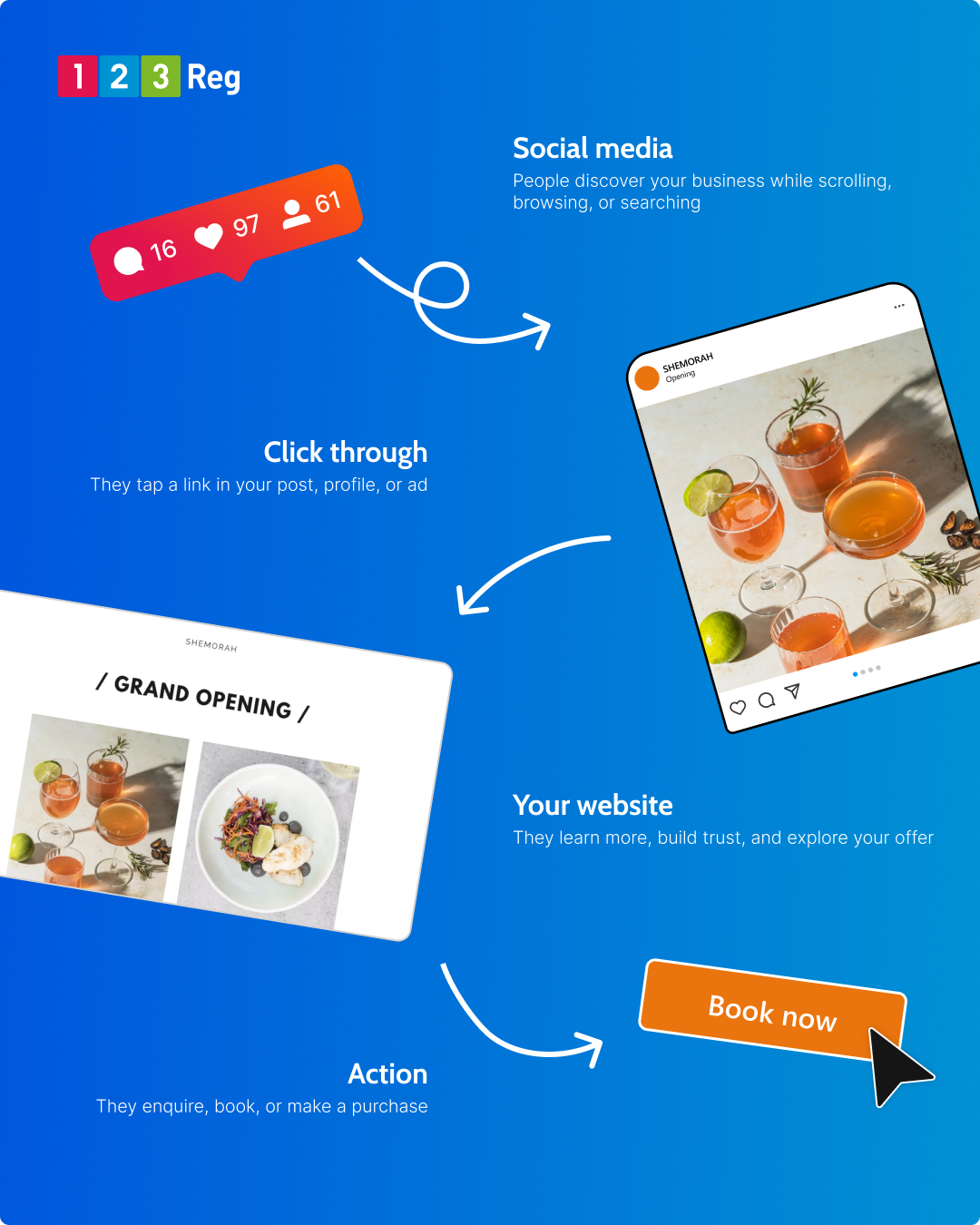
When your social media and website work together, you create a simple, joined-up journey: someone discovers your brand, clicks through, and takes the next step.
❝Social media is often the first place people go today when they’re curious about a brand, service or product.❞
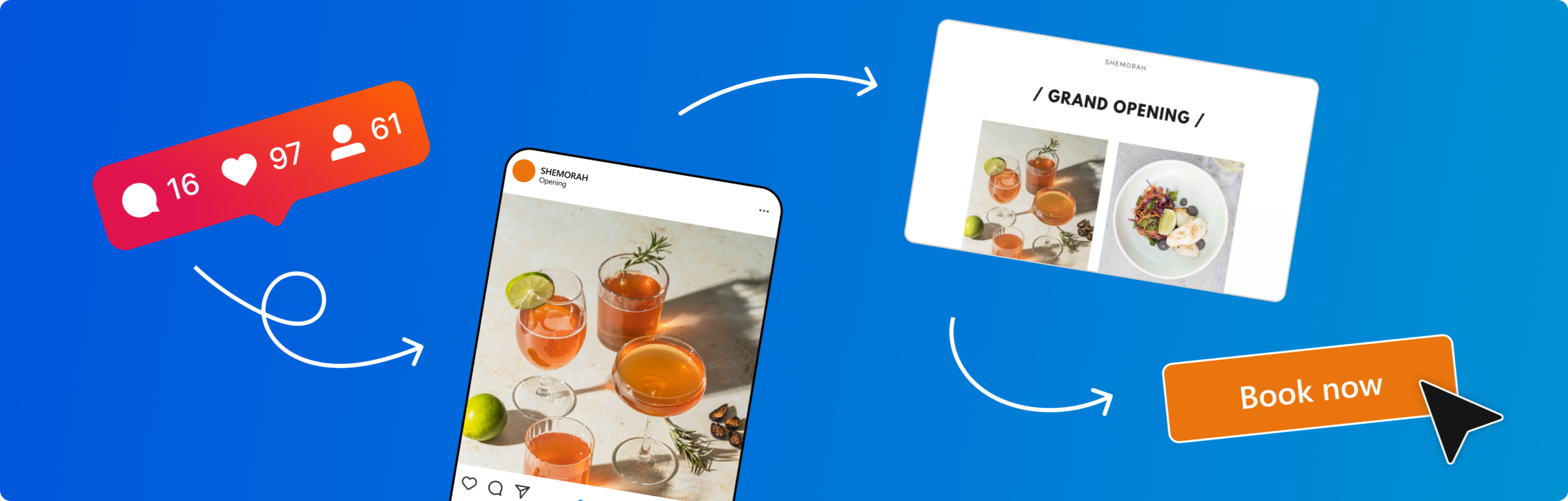
Social gets attention and drives traffic — your website turns that traffic into results.
Social helps people come across your business, see what you do, and start to recognise your brand. Your website is where they go next.
Your website is the one place you fully control. You decide how your services are presented, what information people see, and what action they take. Without that, social media attention can easily go nowhere.
Your website is there so people can:
✓ understand what you offer
✓ find answers to common questions
✓ feel confident in choosing you
✓ take action — whether that’s getting in touch, booking, or buying
How social and website work together
| Stage | Social media | Website |
|---|---|---|
| Discovery | Helps people find your business and become aware of what you offer | Limited role in discovery, usually visited after social or search |
| Engagement | Builds familiarity through posts, videos, and interaction | Builds deeper understanding through clear information and structure |
| Consideration | Encourages interest and keeps your brand top of mind | Explains services, pricing, and answers key questions |
| Conversion | Drives clicks through links, posts, and ads | Turns visits into enquiries, bookings, or sales |
| Control | Platform-led, shaped by algorithms and trends | Fully controlled by your business, including content and user journey |
For more, check out: Website Builder vs Web Hosting — Which Works Best for Your Business?
How to build a social media strategy for small businesses
Good social strategy is not about being everywhere or posting constantly. It is about choosing the right platforms, staying consistent, and making sure everything you share supports your wider business goals.
Start with the channels your audience already uses. Focus your time there rather than trying to cover everything. Make sure your profiles are clear, up to date, and linked to the most relevant pages on your website. For most small businesses, a simple, consistent approach works best.
First, make sure your profiles are complete and consistent. This includes:
✓ A clear description of what you do
✓ Up-to-date contact details
✓ A strong profile image and branding
✓ A direct link to your website or a relevant landing page
This should establish an easy path from social to your website.
What social content to post
The goal is simple: give people a reason to stop scrolling.
If you’re unsure what to post, look at what people already respond to. The posts that get saves, comments, or shares are your strongest signals. Do more of those.
Content that gets attention:
✓ Helpful posts
Answer common questions or share quick tips your audience can use straight away. Examples might be: a bakery sharing “3 ways to keep bread fresh longer” or a plumber explaining “why your boiler pressure drops.”
✓ Behind-the-scenes content
Show the people and process behind your business. This builds trust and makes your brand feel more human.
Think packing orders, prepping for the day, or a quick “before we open” clip.
✓ Before-and-after results
Transformations are easy to understand and often stop the scroll.
This could be a cleaned garden, a redesigned website, or a repaired item.
✓ Customer moments and testimonials
Keep it natural and real. Short reactions or quick quotes often feel more authentic than polished reviews. Example: “Here’s what Sarah said after we fixed her leak.”
Use social to help guide the customer journey
Social platforms are more than just marketing. It’s now a core business channel. It helps you reach new people, build trust over time, and bring in enquiries or leads.
They’re also where people ask questions, check out brands, and get a feel for what a business is like. They can also help with customer service, shape how people see your brand, and give you a better sense of what your audience cares about.
The real value comes when you pay attention to what’s working. Looking at engagement, website traffic, and conversions helps you see what’s landing well and where there’s room to improve.
Consistency usually matters more than perfection. Posting regularly, and taking a bit of time to reply to comments and messages, helps keep things moving and your business in people’s minds.
Common mistakes to avoid
✗ Not linking social profiles to a clear, relevant website page.
✗ Posting content without a clear call to action.
✗ Sending people to a homepage when a more specific landing page would work better.
✗ Focusing on likes and shares instead of clicks, enquiries or sales.
✗ Posting inconsistently, so the audience never quite knows when to expect you.
✗ Ignoring comments and messages, which can make the business seem less responsive.
✗ Finally… treating social media and your website as separate channels rather than part of the same journey!
Choosing the right platform for your business
You don’t need to be on every platform. Better to focus on one or two where your audience already spends time.
Focus on platforms where your audience is already active. For example, visual businesses often perform well on Instagram, while service-based businesses may benefit more from Facebook or LinkedIn.
Facebook – still a strong all-round option for established audiences
✓ Large, broad audience. 25–34s are the largest Facebook age group, making up 24.7% of users
✓ Good for local businesses, community building, and events
✓ Useful for ads and retargeting
✗ Organic reach can be limited without paid support
Instagram – the winner for visual sharing and brand storytelling
✓ Great for photos, short videos, and product showcases
✓ Strong with younger, mobile-first audiences. 62% of users are under 35.
✓ Good for building a consistent brand feel
✗ Needs regular, high-quality visual content to stay active
X (Twitter) – real-time updates and fast-moving conversations
✓ Built for fast-moving discussion because it is widely used for real-time conversations, trending topics, and quick responses.
✓ Useful for joining industry conversations and trends
✓ Can support customer service and direct responses
✗ Fast-paced, so posts can get lost quickly
✗ Needs frequent activity to stay visible
TikTok – fast growth through short-form video
✓ High reach potential, even for smaller accounts
✓ Works well for creative, informal content
✓ Strong engagement with younger audiences, with users spending an average of 42 hours a month on the platform!
✗ Requires regular video creation and trend awareness
LinkedIn – best for professional and B2B connections
✓ Ideal for service businesses and B2B audiences
✓ Strong for sharing insights and building credibility
✓ Helps connect directly with decision-makers
✗ Less suited to casual or highly visual content
YouTube – long-term value through searchable video content
✓ Great for tutorials, demos, and explainers
✓ Content can continue to bring in views over time
✓ Strong for building trust through helpful content
✗ More time and effort needed to produce quality videos
Which social platform for my business?
| Platform | Audience | Content type | Best for |
|---|---|---|---|
| Broad audience, especially 30+ | Posts, images, groups, events, ads | Local businesses, community building, targeted advertising | |
| Younger, mobile-first users (16–34 core) | Photos, reels, stories, short video | Brand storytelling, product showcasing, visual identity | |
| X / Twitter | News-driven, real-time users, industry audiences | Short updates, links, commentary, threads | News, announcements, customer support, live conversations |
| TikTok | Strong Gen Z and millennial audience | Short-form video, trends, storytelling | Brand discovery, viral reach, creative engagement |
| YouTube | Wide audience, search-driven users | Long-form video, tutorials, explainers, shorts | Education, product demos, evergreen content |
| Professionals, B2B audiences, decision-makers | Articles, insights, updates, company news | B2B marketing, Thought Leadership, recruitment |
Getting more from organic (free) social
✓ Post regularly. Once, twice, even three times weekly is a good place to start. But don’t overdo it — daily posting can risk losing followers.
✓ Use clear captions with a simple calls to action (visit your site, message you, book a slot).
✓ Reply/Like the comments and messages you recieve to thank them and encourage more engagement.
✓ Reuse your best content in different formats across all channels, perhaps even YouTube (turn a tip into a short video, for example).
Make life easier with social media management tools (if you like)
Social media management tools can help you plan and post across different platforms from one place. They’re usually paid, and not essential for everyone, but they can make things easier if you’re short on time or managing a few channels at once.
Tools like Buffer, Hootsuite, Later, and Sprout Social each offer different ways to plan content, manage accounts, and track performance.
They can also help you stay organised, see what’s working more clearly, and manage messages without jumping between different apps.
For more, check out: Top 8 Social Media Management Tools
Website Builder: Manage your social media from your website
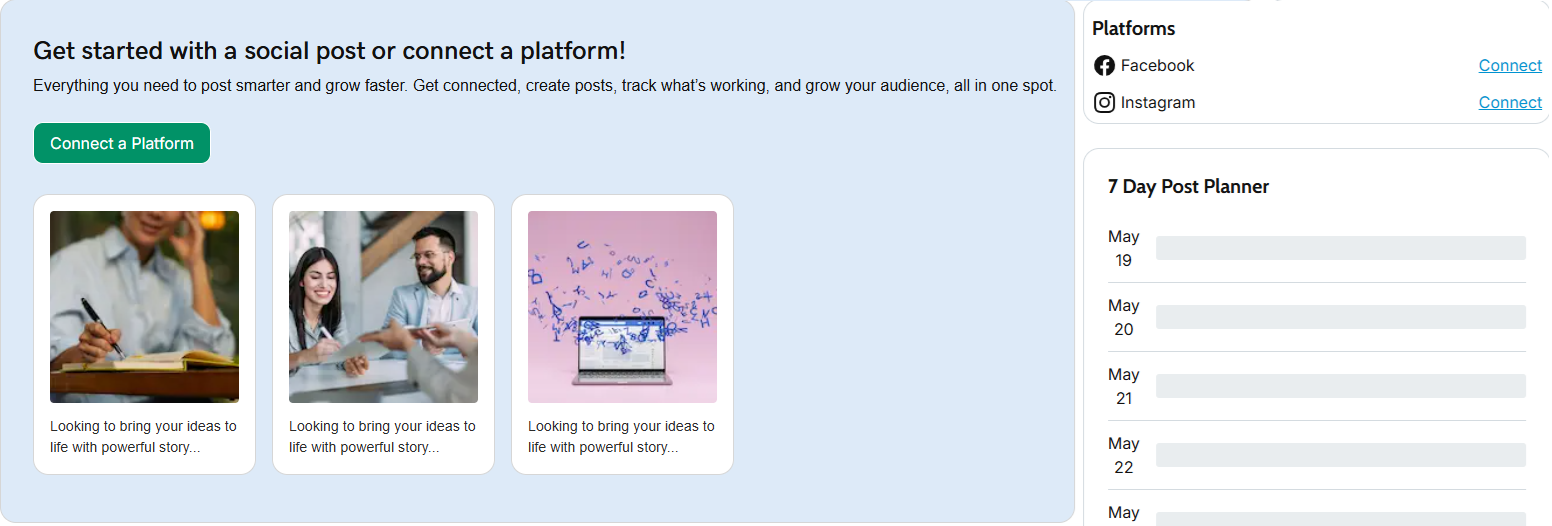
With 123 Reg Website Builder, you can also manage some of your social media in the same place your website lives. On selected plans, social accounts connect directly from your dashboard, allowing posts to be created or scheduled without jumping between apps. It’s a great way to keep things simple — especially when time is tight or everything needs managing in one go.
Want to see how it works? Learn more about Website Builder and how it helps you build your site, keep it updated, and manage everything in one place.
Growing faster with paid social
Paid social works best when it builds on what’s already working. Once you’ve found the posts, offers or messages that get attention, a small budget can help you reach more of the right people and bring more visitors back to your website.
That way, you’re not just paying for visibility — you’re paying to move people closer to enquiry, booking or purchase.
What paid ads work best?
☐ Boosted posts
Promote posts that already perform well to reach more of the right people.
☐ Carousel ads
Show multiple services or products in one ad, helping people quickly understand what you offer.
☐ Video ads
Simple videos—like quick explainers or day-in-the-life clips—help build connection and clarity.
☐ Lead ads
Let people send enquiries without leaving the platform, useful for quotes or sign-ups.
Paid vs organic social media
| Aspect | Organic social | Paid social |
|---|---|---|
| Reach | Limited to followers and algorithm visibility | Can reach new, targeted audiences quickly |
| Speed | Builds gradually over time | Delivers faster visibility and traffic |
| Cost | No direct spend, but time required | Requires budget, scalable based on goals |
| Purpose | Builds trust, awareness, and engagement | Drives targeted traffic, leads, and conversions |
| Best use | Consistent posting and community building | Campaigns, offers, and boosting high-performing content |
Budgeting without wasting money
Start small so you can test what works without overspending.
☐ Start small, around £5–£15 per day for a short test.
☐ Change one variable at a time (image, audience, or message).
☐ Focus on results that matter: clicks, enquiries, and bookings—not just likes.
Over time, shift more budget towards what actually brings in leads or sales.
See also: How to Get Your Business Found with Google Ads
Simple ways to track performance
Start with the tools you already have. Platform insights from Facebook, Instagram and other social channels show reach, clicks, and engagement, giving a quick sense of what content is landing well.
Meta Ads Manager is the Insta and Facebook’s ad tool, used for running and managing paid campaigns across Facebook and Instagram. It gives more detailed data on how ads are performing, including audience breakdowns and results.
Tracked links can be useful when you want to see which posts or ads are driving traffic to your site. Tools like Buffer can help with planning and reviewing content in one place, though they’re not essential when starting out.
You don’t need complex tools to know if your social media is working. Start with a few simple signals: whether people are clicking through to your website, getting in touch, and taking the next step through a booking or purchase. If you’re running ads, it’s also worth checking how much you’re paying for each lead, so you can see whether the spend is worth it.
Why your website still matters most
It’s where people go when they want more detail, such as pricing, services, availability, or how to get in touch.
A good website removes friction, making things clear, answering the right questions, and giving people a simple next step. It’s where you turn interest into action.
That might be:
☐ Getting a quote
☐ Booking a call
☐ Viewing pricing
☐ Buying a product
Unlike social platforms, you control how everything is presented and what people do next. Every piece of social content should guide people towards one of these actions.
None of this works without the basics in place. That means finding a great domain, plus a tool to bring it all to life like Website Builder or Managed WordPress Hosting.
Wrap up
Think of social media as the spark and your website as the engine. One grabs attention; the other turns that attention into real results. The small businesses that see the best growth aren’t trying to be everywhere at once. They’re showing up consistently where it matters, guiding people back to a website that makes taking the next step simple.
Keep it focused, keep it easy, and keep it working together — because when your social media and website pull in the same direction, that’s when things really start to move.

Learn more about 123 Reg Website Builder