

If you own a local business, your Google Business Profile might be the first thing customers see, even before your domain name and website. It’s the listing that shows up on Google Maps and in local search results, complete with your hours, photos, and reviews.
Getting your Google Business Profile set up can be just as essential as having your own pages. Skipping it means missing out on how many nearby customers actually find you.
Google Business Profile — Key takeaways
- ☑︎ Having a Google Business Profile is essential if you want customers to find your business on Google Search and Google Maps.
- ☑︎ Customers can see useful information at a glance, including your location, opening hours, contact details, as well as those all-important reviews.
- ☑︎ It’s a key part of local SEO, helping search engines understand your business and show it to relevant customers nearby.
- ☑︎ For a small local business, it’s arguably just as important as having a domain name, business email and your own website.
- ☑︎ It’s free and easy to verify your business and create your profile, so you can get started in just a few minutes.
What is a Google Business Profile
Google Business Profile is your free listing on Google Search and Google Maps. It shows people useful details about your business, including your name, address, phone number, opening hours, photos and reviews, helping them find out more and decide if you’re right for them.
It used to be called Google My Business, and used to live in its own app. Now you can manage it directly through Search and Maps.
Why it matters for small businesses
Search for something like “Italian restaurant in Bath” and Google shows a map with three local businesses listed beneath it, right at the top of the results, above the regular organic listings. This is the Local Pack, and it’s the first thing most people see when they’re searching for a local business.
A well-maintained Google Business Profile is what gets you considered for one of those three spots, putting you in front of people who are already looking for exactly what you offer.
For small businesses serving a specific town or area, that can translate directly into more calls, more website visits, more bookings, and more people walking through the door.

Source: Google
What shows on your profile?
Your Google Business Profile brings together many of the details customers want to see:
☐ Business name, address, phone number and website
☐ Opening hours, including special hours for holidays
☐ Photos and videos of your premises, products or team
☐ Customer reviews and your responses
☐ Services, products and useful attributes (like “Offers delivery” or “Wheelchair accessible”)
☐ Posts for updates, offers and events
☐ Messaging, Q&A and booking options where available
How it fits with your other online tools
Think of your Google Business Profile as another important tool for your business alongside your domain name, your professional email address, and of course, having your own website.
Your domain and website give people somewhere to learn more about your business and take action, while your business email gives you a professional way to communicate with customers.
For small businesses, it’s a way to put your business in front of local customers — and it doesn’t cost anything to set up!
Why create a Google Business Profile
✓ It puts you on the map (literally) and in search results
A verified, complete Google Business Profile is what allows your business to show up in what Google callls the “Local Pack” (the three map listings that appear at the top of many local searches) as well as on Google Maps itself.
Listings in the Local Pack get 126% more traffic and 93% more actions — like calls, website clicks and requests for directions — than businesses ranked 4th–10th, according to SOCi, via LinkedIn (Thad Barnes). Without that profile, you’re more or less invisible for “near me” searches.
✓ It’s free marketing with a real return
Setting up and running a GBP costs nothing. It’s one of the only channels where a small local business can compete directly with much bigger names in the same search results.
✓ It builds trust before anyone contacts you
Your Google Business Profile works like a public reputation score.
According to Google’s “Grow with Google” training materials, citing Ipsos research (2017), up-to-date profiles are 2.7 times more likely to be considered reputable, 70% more likely to attract visits, and 50% more likely to lead to a purchase.
✓ It’s a really big factor in local search ranking
Google looks at your listing details (category, completeness, reviews, photos, posts and accuracy) as part of how it ranks businesses locally.
Local search experts surveyed by Whitespark’s Local Search Ranking Factors survey rate Google Business Profile signals as the single most influential category in local pack rankings, accounting for roughly 32% of the weighting, ahead of on-page SEO, reviews, links and citations.
✓ It lets you engage with customers directly
Reply to reviews, post updates and offers, answer questions, and add photos — because you should, but also because doing so helps keep your listing active.
Businesses with 100+ images gain far more direction requests and website clicks compared with profiles that have just one image.
✓ It gives you useful insight into your customers
Insights show how people are finding you, where they’re searching from, and what they do next whether that’s calling, visiting your website, or getting directions. This helps you understand demand and fine-tune your hours, services and marketing.
How to claim and verify your Google Business Profile
1. Claim your business on Google.
First, visit Google Business Profile and click Create your profile.
Sign in to your Google account if you’re not already, or create a new account if you don’t have one yet.
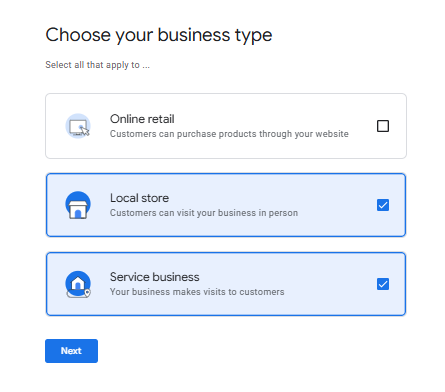
Google will first ask for your business name. Enter the name you use publicly, then choose the type of business you run. You can select more than one option from online retail, local store or service business.

2. Add your core business details.
Enter the category that best describes your business. This helps Google understand what you offer and when your profile should appear in relevant searches.
Choose the most specific category available rather than a broad one where possible.
3. Add your business address.
Next, tell Google where your business operates. If customers visit you at a physical location, enter your business address so it can appear on Google Maps.
If you run a service-area business or don’t want customers visiting your address, you can choose the option to hide your address and instead specify the areas you serve.

4. Add your contact details.
Enter your phone number and website address. Keep these details consistent with the information on your website and other online listings. Matching information makes it easier for Google and customers to understand that they’re looking at the same business.
5. Verify your business.
Google needs to confirm that you represent the business before you can fully manage your profile. Depending on your business and location, Google may offer verification by video, phone, email or another method.
Follow the verification instructions Google gives you. Once your business has been verified, you can manage your profile and start adding more information, such as opening hours, photos, services and a description.
What if my business is already claimed?
If your business already appears on Google but someone else has claimed the profile, you can request access rather than creating a new listing. Search for your business on Google or Google Maps and select the profile. Look for an option such as Request access or Own this business? and follow the instructions.
Google will contact the current profile owner and give them a set period to respond. If they don’t respond, you may be given the option to claim the profile yourself.
Be careful not to create a second profile for the same business! Duplicate listings can cause confusion for customers and may need to be removed or merged.
How optimise your Google Business Profile
Once your profile is claimed and verified, the real value comes from the dashboard behind it. Here’s what each part does and how to get the most out of it.
Start with the basics: your business name, category, address (or service area), phone number and website. These help Google understand what you do and match you to the right searches, so it’s worth taking a moment to get them right.
From there, add your opening hours, including any seasonal or holiday changes, so customers know when to reach you. A short business description and a few relevant services or products help fill out the picture.
Info
This is where your core business details live: name, address, phone number and hours. Keep it updated whenever anything changes, even temporarily. Google will often send you a reminder to update things like holiday opening hours.
Photos
You can upload your own photos here and see any that customers have added. People (and especially younger people) expect to see what they’re getting before they get in touch, so include good-quality shots of your premises, products or work, your team, and your logo. A strong set of photos can be the difference between a click and a scroll-past.
Products and services
These sections let you spell out exactly what you sell and what makes it worth choosing you. Update them whenever your offering changes. If you take bookings, you can also add a direct scheduling link here so customers can book straight from your listing.
Calls and messages
Google can track the calls and messages that come through your profile, giving you a clearer picture of your leads. The calls data breaks down missed calls by day and time, so you can spot when you need extra cover on the phones. Messages let customers contact you directly from search or Maps without ever dialling a number.
Insights
Insights is your profile’s built-in analytics. It shows how people are finding you, where your searches are coming from, and what they do next — whether that’s calling, visiting your website or getting directions. It also breaks down how many people found you by searching your business name directly versus searching for your type of service.
Posts
Posts let you share offers, news and updates directly on your listing. Seasonal promotions, new arrivals or limited-time deals are all good candidates. Since posts appear right alongside your listing in search, a strong, clear headline matters.
How to optimise Google Business Profile for local search
Your primary category carries a lot of weight here and it’s one of the biggest factors in how Google matches you to local searches. Choose the option that best describes what you do, and add secondary categories too, if they genuinely apply.
Keeping things active helps as well. Regular posts, fresh photos and up-to-date hours all send the same signal to Google: that your business is alive and worth showing to nearby customers.
It’s important to try to keep your details the same everywhere they appear, both on your website and your Business Profile, as well as any other online listings. Mismatches in your address or phone number can hold your SEO back, even when all else on your profile is spot on.
How Google Business gets you found on Google Maps
Google Maps isn’t just for directions. People also use it to find nearby businesses, check opening hours, read reviews and get contact details. Search for a restaurant, hairdresser or plumber, and Google may show local businesses right on the map.
For brick-and-mortar businesses, this is especially useful. If you have a shop, restaurant, salon or office that customers visit, your Google Business Profile helps them find you and see where you’re located. Google looks at details such as your business category, location and opening hours when deciding which businesses to show for local searches.
And once you appear, your photos, reviews and up-to-date details can help you stand out and give people a reason to choose you. Your Google Business Profile can be the first step from a Google search to a visit or enquiry.

For more, check out: Local SEO – How Do I Get My Business Found Online?
Why your reviews on Google really matter
Reviews are often the first thing people check before they visit or book. A good set of recent reviews builds trust fast, and can be the reason someone picks you over the business next door.
For places like restaurants and cafes, this really shows. A few five-star reviews about the food or service can turn a browser into a booking. A handful of poor ones can just as easily send them elsewhere.
They’re worth encouraging. Most happy customers are glad to leave one if you simply ask. And when you take a moment to reply, to the good reviews and the occasional bad one, it shows you’re paying attention. Active, responsive profiles like this tend to perform better than ones that go quiet.
Reviews also feed directly into your local ranking, so replying isn’t just good manners — it genuinely helps more customers find you in the first place.
See also: What is Reserve By Google? and How to Make a Restaurant Website
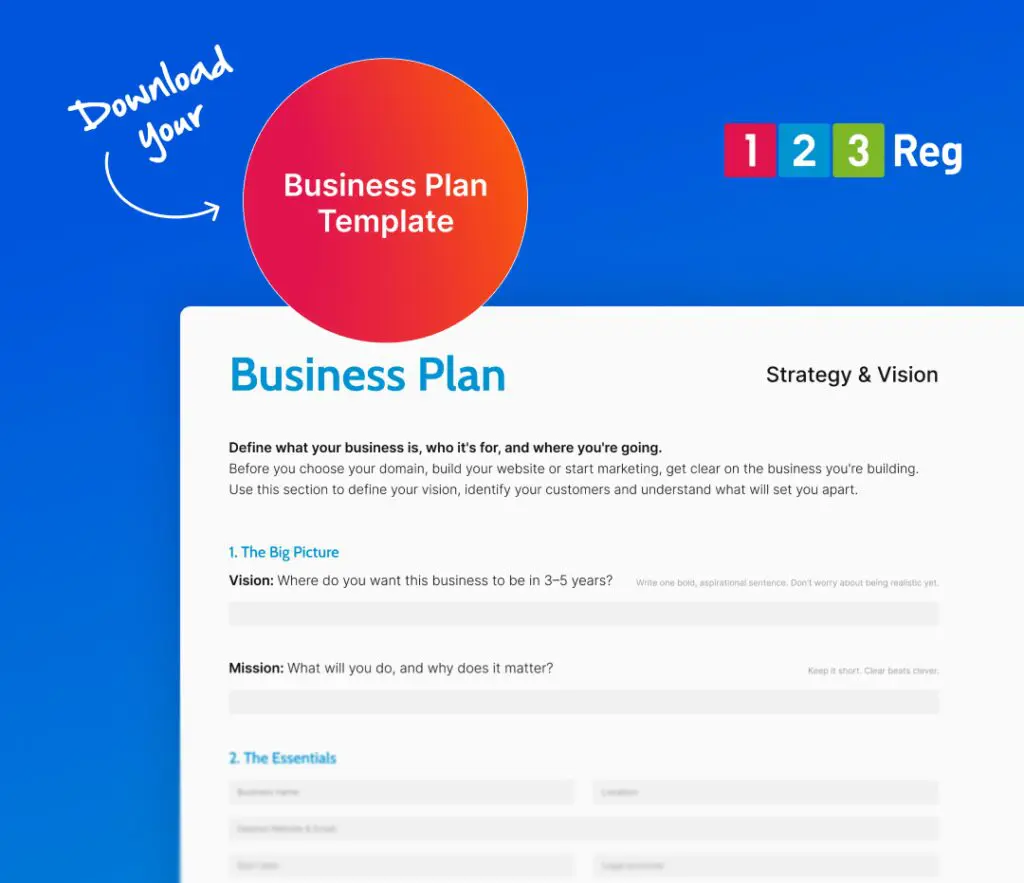
Our Free Business Plan Template helps you map out your next steps, so you start with a clear plan — download it here.
I want to get my business seen faster! Can I pay to appear on Google Search?
Yes! Google Ads is the main platform if you want to pay to show your business to people who are searching for products/services you offer.
Your ads can appear near the top of Google Search and, where eligible, in Local Services Ads. Paid ads work alongside your Google Business Profile rather than replacing it. So where your profile helps you show up in unpaid (organic) search results, while Google Ads can get you in front of more potential customers straight away.
For a small business, using both together can be a smart approach: ads help you reach people right now, while your profile builds up reviews and visibility in unpaid search over time.
For more, check out: How to Get Your Business Found with Google Ads
Wrap up
Your Google Business Profile costs nothing to set up and takes just minutes, but it can genuinely change how easily customers find you. If you’re claiming your listing for the first time, or just giving an existing one some attention, small details like a category, a photo, or a reply to a review all help. The result is a business that’s easier to find, and easier to trust, before a customer even walks through your door.

Google Business Profile FAQ
Is a Google Business Profile free?
Yes, creating and managing a Google Business Profile doesn’t cost anything. It’s one of the few marketing tools available to small businesses with no price tag attached.
How does a Google Business Profile help with local SEO?
Google uses the information on your profile, like your category, reviews and location, as a key signal when deciding which businesses to show for local searches. A complete, active profile gives you a real chance of appearing in the map results people see first.
Do you need a Google Business Profile if you already have a website?
Yes, the two work together rather than replace each other. Your Business Profile helps people discover you exist, while your website gives them somewhere to learn more, so it’s worth having both, alongside a proper domain name and business email address. If you don’t have a website yet, tools like 123 Reg Website Builder or Managed WordPress make it easy.
How often should you update your Google Business Profile?
Businesses that post updates and respond to reviews tend to appear more active and trustworthy to both customers and Google.
Can you have a Google Business Profile without a physical shop or office?
Yes, service-area businesses like mobile hairdressers, plumbers or consultants can set up a profile without showing a public address. You’ll just need to specify the areas you cover instead of a storefront location.
How is AI search changing Google Business Profile?
As AI-powered search becomes more common, people can get quick answers about local businesses without clicking through to a website. Increasingly, your Google Business Profile is where that main info is being pulled from.
For more, check out: How to Show in AI Search Answers – 8 Top Tips for Business Owners