Domain names are the unique addresses that make websites easy to find online. You can think of them as house names on a virtual street.
Not all domain names are created equal, though – some stand out above the rest and, while it has never been easier to find a cheap web domain, the most sought-after names can be incredibly valuable.
In this guide, we’ll explore what makes domain names essential and why choosing the right one can help you stand out online.
What is a domain name?
A domain name is your unique address on the internet — the name people type into a browser to find your website. Just like a home has a street address, every website has a domain name that points people to the right place.
Every domain name is made up of two core parts:
☐ The second-level domain (SLD) — ie, the middle bit. It’s the main recognisable part of the name. It’s usually your brand, business name, or something closely related to what you do
☐ The top-level domain (TLD) — this is the extension at the end, like .com. It says something about the purpose or origin of a website, for instance .co.uk for British brands or .org for organisations.
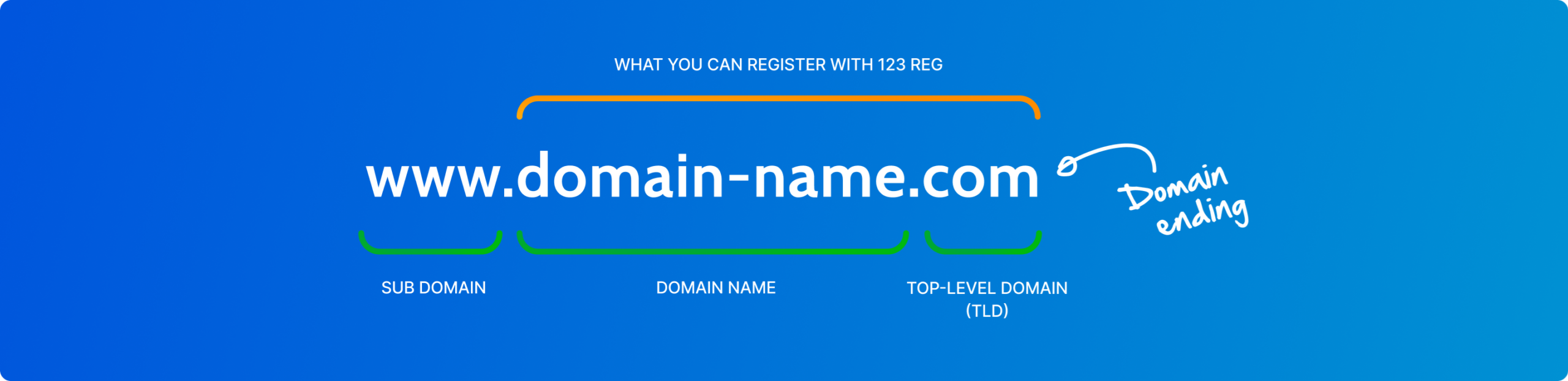
Together, these two parts form your complete domain name (like 123-reg.co.uk).
When someone types your domain into a browser, they’re taken directly to your website.
Your domain name is unique to you, just like a fingerprint. No two websites can share the exact same domain, which means once it’s registered, it’s exclusively yours for as long as you keep it.
Did you know you can get a domain for free? To learn how, check out: How to Get a Free Domain Name
How to choose a domain name
Choosing the right domain name is one of the most important decisions you’ll make for your online presence.
At 123 Reg, you can use our domain name search tool to explore thousands of domains with 400+ different endings (aka TLDs or domain extensions). If the domain you want is available, you can buy it through us, and it’ll be registered in your name with 123 Reg.
Key things to keep in mind:
✓ Make it relevant — your domain should reflect your brand, business name, or what you do. If someone sees it out of context, they should have a good idea of who you are
✓ Keep it short and simple — the easier it is to type, the better. Avoid long strings of words, unnecessary hyphens, and anything that could be easily misspelled
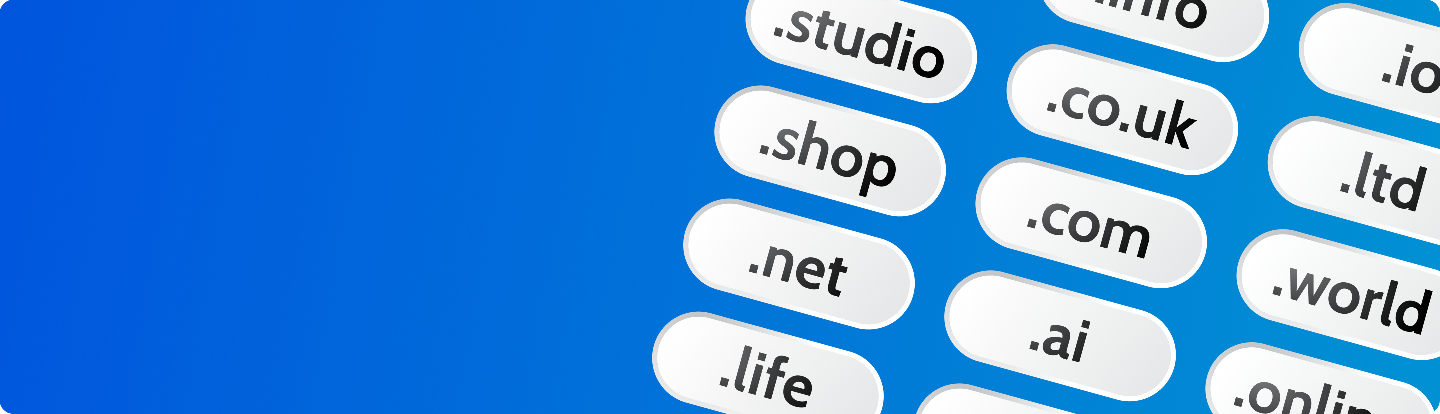
✓ Choose the right TLD — .com and .co.uk are the most recognised, but there are over 1,500 extensions available. Country code TLDs like .fr or .jp signal location, while newer generic TLDs like .studio, .shop, or .london can make a strong branding statement
✓ Think about protection — consider registering alternative TLDs and common misspellings of your domain to protect your brand and capture any traffic you might otherwise lose
Not having a .com doesn’t have to be a deal breaker. The most important thing is finding a name that fits your brand and is available. If your ideal .com is taken, a well-chosen alternative TLD can work just as well.
In recent years, there’s been a wave of new “generic” TLDs (gTLDs), giving you choices like “.fun”, “.club”, or “.london”.
Choosing a TLD that suits your business can be a smart branding decision.
For more, check out: How to Choose the Best Domain Ending in 2026
How to register a domain name
Here’s how domain name registration works, and the steps to follow to get your own:
1. Search for your domain
Head to a trusted registrar like 123 Reg and enter the name you’d like into the domain search. You’ll instantly see whether it’s available. If not, you’ll get suggestions for similar alternatives.
For example, if yummycakes.co.uk is taken, the search might show that yummycake.co.uk, theyummycakes.co.uk, or yummycakes.store are still available.
Not sure where to start? Try the 123 Reg AI Domain Search tool to generate domain name ideas based on your business, niche, or keywords, so you can find the perfect name faster.
2. Register your chosen domain
Once you’ve found one you like, you can register it there and then. With 123 Reg, you can secure a new domain for as little as 1p for the first year.
You can even get a domain for free with the right plan!
3. Add hosting
To make your website visible on the web, you’ll need a hosting plan. 123 Reg offers a range of UK web hosting options to suit every type of site — from personal blogs to growing businesses.
You’ll need to get the best UK web hosting for your domain so anyone on the web can view and access your site.
For more, take a look at: How to Buy a Domain Name – A Step-by-Step Guide (and Useful Tips)
How many domain extensions are there?
With more than 1,500 domain name extensions in existence, you should have no problem finding your perfect web address.
Here are just a few types you can choose from:
✓ Generic top-level domains (gTLDs): .com, .net, .org, .biz and more.
✓ Country code top-level domains (ccTLDs): .be, .de, .es, .uk, .us and others.
✓ Geographic extensions: .berlin, .london, .vegas and more.
✓ New generic top-level domains (New gTLDs): .dentist, .accountant, .construction and more.
If you want to see more extensions, check out the cheap domain registration page on 123 Reg.
How domain names work
What is the Domain Name System (DNS)?
The Domain Name System (DNS) is what helps you find websites using names instead of numbers. Every site on the internet has an IP address — a string of digits that computers use to talk to each other. Since those numbers are hard to remember, DNS was created to make things simpler.
Think of it like the internet’s phone book. It keeps a huge list of domain names and matches them to the right IP addresses. So when you type a web address into your browser, DNS works behind the scenes to find the exact location of that site.
This process is called a DNS lookup. Your browser sends a request, DNS finds the matching IP address, and the website loads on your screen.
This entire process typically takes just milliseconds, so fast you’d never notice it’s happening.
See also: How Do Websites Get Found Online? (DNS Guide)
Where do domain names come from?
The domain name system is overseen by a non-profit organisation called ICANN (Internet Corporation for Assigned Names and Numbers). Founded in 1998, it coordinates how domain names are managed so the internet runs reliably.
ICANN approves new domain extensions, sets the rules for how they’re used, and can remove them if needed. It doesn’t handle everything directly, though. Instead, it works through a layered system:
☐ Registries — ICANN delegates control of individual TLDs to organisations called registries. Each registry manages the database of domains registered under their extension and makes it accessible through the WHOIS tool. For example, Verisign manages .com, while Nominet manages .uk
☐ Registrars — Registries then authorise companies called registrars to sell domain names directly to customers. If you want to register a domain, you go through a registrar — like 123 Reg — which gives you access to domains from multiple registries all in one place.
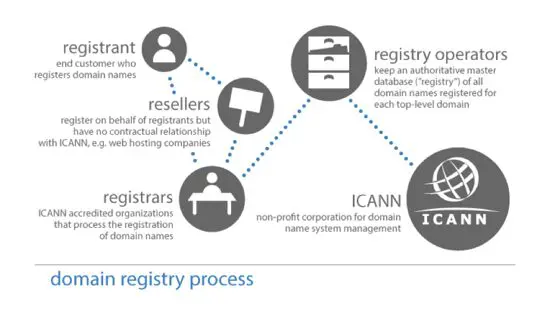
Source: ICANN
Prior to 1995, anyone who wanted to could register free domain names. That changed when the National Science Foundation granted Network Solutions the right to begin charging for registrations. From then on, domain names came at a price—$100 for a two-year registration (quite the sum at the time!)
How do new domains get released?
Now, let’s assume a new extension has been approved is about to hit the market.
Typically, there are three stages to the registration process:
Sunrise: This stage is for trademark holders. It gives them first chance to register domain names linked to their brand, helping protect against misuse. In some cases, they can also block others from registering matching names.
Landrush: Next comes landrush, where anyone can apply for a domain. If more than one person wants the same name, it may go to auction. This stage often comes with higher prices, but gives a better chance of securing popular domains before general release.
General availability: Finally, the remaining domains become available on a first come, first served basis. If the name you want is free, you can register it straight away.
Not every extension follows this exact process, but most new releases use a similar structure.
What restrictions are there for domain registration?
There are some general rules to be aware of before you register:
☐ Domains must usually be between 2 and 63 characters
☐ You can only use letters, numbers and hyphens
☐ You cannot use punctuation or symbols
☐ Hyphens cannot be used at the start or end of a domain
☐ Domain names are not case sensitive
☐ Some domains allow special characters (IDNs — Internationalised Domain Names)
Country Code domain (ccTLD) Restrictions
If you’re considering a country code TLD, it’s worth checking the rules before you register. They vary by extension:
✓ Some ccTLDs require local presence (e.g. .au requires an Australian business number or local contact)
✓ Others, like .uk, are open to anyone globally
✓ Some have been creatively repurposed — .me (Montenegro) and .it (Italy) are popular choices for personal brands and tech businesses
See also: What is a Top-Level Domain (TLD)?
What if I miss out on a domain name?
If you’ve got your eye on a specific domain, it’s worth acting early — especially when new extensions are released and demand is high.
But if the name you want is already taken, you’ve still got options. You could try a different extension, or look at the secondary market, where domain names are bought and sold.
You can attempt to buy a domain that has already been registered with Premium Domains from 123 Reg.
How can I use my domain as an email address?
One of the most benefits of registering a domain name is that it lets you create a custom, professional email address.
So instead of using a generic address like yourname@hotmail, you can have something like hello@your-big-idea.com. It’s a fantastic way to build your brand and credibility with customers.
With 123 Reg’s professional email hosting, you get a free domain included for the first year — so you can get your email address and web address sorted in one go. Alternatively, if you already have a domain or prefer to register one separately, you can easily link it to your email hosting later.
See also: What are the Benefits of a Professional Email Address? and Half Typed, Fully Brilliant – Professional Email Powered by Titan

Learn more about 123 Reg Professional Email
What happens after I register my domain name?
Once you’ve registered a domain name, it’s yours to use for as long as you keep renewing it. Most people use a domain as their website address and/or email address.
If you fail to renew it, it will expire, but you’ll still have the chance to register it. Next comes a redemption period, during which you may be able to renew the domain if you pay a recovery fee.
After that, the domain is released back onto the open market and can be registered by someone else. It’s a good idea to set up auto-renew and keep your payments up to date to avoid this happening.
How do I keep my domain safe and secure?
Registering a domain is just the first step — keeping it secure and protected matters just as much. Here’s what you should have in place from day one.
Automatic renewal
If your domain expires, you risk losing your website, your email addresses, and the brand identity you’ve built — and an expired domain can be snapped up by someone else quickly. Setting up automatic renewal means your domain renews in the background before it runs out, so you don’t have to track dates or worry about missing a window.
It’s a simple step that keeps everything running without interruption, especially when things get busy.
Privacy Protection
Without domain privacy, your personal details — including your name, home address, and contact numbers — could be publicly visible to anyone via ICANN’s WHOIS database.
Domain Privacy and Ownership Protection from 123 Reg gives you everything you need to keep your domain safe, including:
☐ Privacy — your personal details are hidden from ICANN’s public WHOIS database, with our contact information displayed in place of yours. Without this, your name, home address, and contact numbers could be publicly visible to anyone
☐ Safeguard against hackers — protection against unauthorised attempts to access or hijack your domain
☐ 2-Step Verification Approval — an extra layer of security that ensures only you can make changes to your domain
☐ 90-Day Domain Holding Period (with Ultimate plan) — if your domain is accidentally deleted or lapses, a 90-day holding period gives you time to recover it before it’s released back to the open market
Learn more about 123 Reg Domain Privacy and Ownership Protection
Protecting data with an SSL Certificate
Alongside domain privacy, SSL Certificates are essential for securing your website.
An SSL certificate encrypts data sent between your site and its visitors, protecting sensitive information like passwords and payment details. That’s what gives your site that all-important ‘padlock’ icon, building trust with visitors and improving your site’s ranking in search engines.
Learn more about 123 Reg SSL Certificates
Wrap up
Domain names might seem a bit technical at first, but they’re really just your address on the internet. Once you understand how they work, it all starts to feel much clearer.
Whether you’re picking your first domain, building a website, or just exploring ideas, the key is to choose something that fits your plans now and can grow with you later. And once it’s yours, keeping it renewed means it stays yours.
When you’re ready, go ahead and register your domain at 123 Reg.

FAQ
What is a domain extension (TLD), and why does it matter?
A domain extension is the part at the end of your domain name, like .com, .co.uk, or .online. It helps show what your site is about or where you’re based. The right extension can make your domain clearer, more memorable, and a better fit for your brand.
Which domain extension should I choose?
It depends on your audience and what you do. .co.uk works well for UK-based businesses, while .com is widely recognised worldwide. Newer options like .store, .online, or .tech can help you be more specific and stand out.
What is the difference between a domain name and a website?
It’s easy to think of a domain name and a website as the same thing. While they’re closely connected, they serve different purposes.
Think of your domain as your address and your website as the building that sits there. When you register a domain, you secure the address — but you’ll still need to build the website and arrange hosting to make it visible online.
To get started, you’ll need to:
1. Register your domain name
2. Choose a hosting plan so your site has somewhere to live
3. Build and publish your website
As your business grows, you can update the look, content, and design of your website as many times as you like, all while keeping the same domain name your customers already know.
How many domain names are registered to date?
As of the end of Q4 2025, there were 386.9 million domain name registrations across all top-level domains (TLDs), according to Verisign’s Domain Name Industry Brief.
Can I register more than one domain extension?
You can, and it’s often a smart move. Registering multiple extensions (like .co.uk and .com) helps protect your name and means you can point them all to the same website.
Do I need a domain extension that matches my business type?
It’s not required, but it can help. For example, a .store domain is great for selling products, while .design or .photography can make it clear what you offer at a glance.