SEO, or Search Engine Optimisation, is about making your website easier to find in search results. It helps people discover what you offer when they’re looking for it online.
Many of the basics are simple enough to do yourself – no technical know-how needed. This A–Z guide will walk you through the key terms and tips to help you get started.

SEO first started to get going as an idea in the mid-late 1990s. Since then, it’s grown into a huge and sophisticated global industry, where dedicated professionals compete fiercely to bring top search engine rank to businesses.
It’s all about making your website easy for search engines to find and, in turn, making it more visible to people who are searching for what you have to offer.
But don’t be intimidated by all the technical jargon: SEO isn’t (though I may need to go into hiding after I’ve said this) rocket science. For most website owners, the DIY basics are really easy.
Finding the right keywords, optimising content, and being mobile-friendly – it’s all well within your reach.
This A-Z glossary aims to make SEO easy by outlining the essential strategies to boost your website in search results. Let’s dive in and hit your search engine potential.
Alt Text
Short for “alternative text”, Alt Text is a short description you add to an image on your website. Alt Text helps with SEO so that people can find your website better. It’s important to know that alt text isn’t the same as a caption that everyone can see — it’s hidden in the HTML code. If the image doesn’t load, the Alt Text can appear instead. Screen readers can use Alt Text to describe images to people who can’t see them. If you want to include image credits or copyright info, though, it’s better to put this somewhere else on your page.
Anchor Text
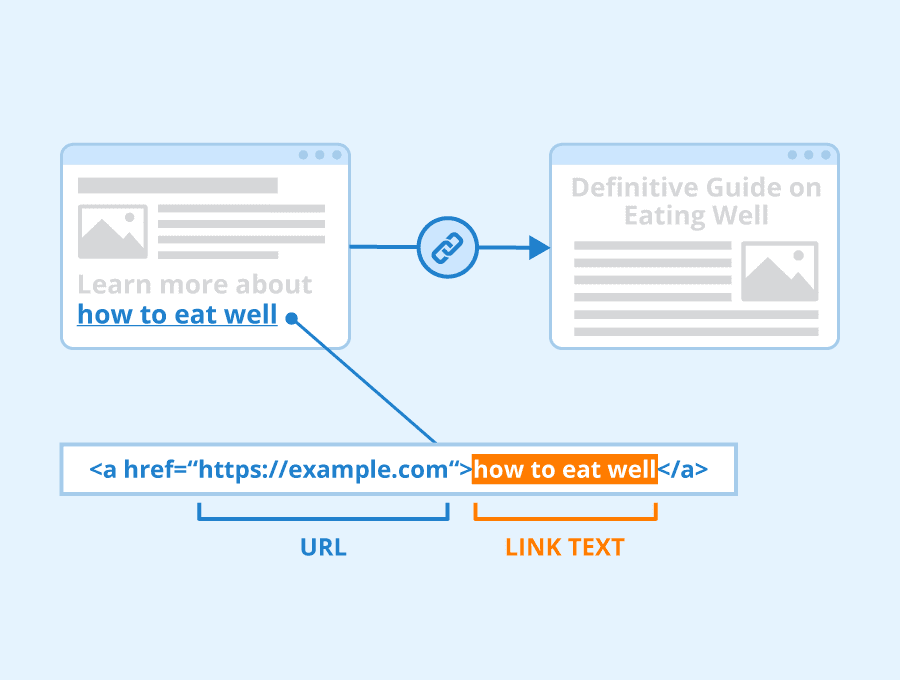
Anchor text is the visible, clickable text placed on a link. It serves as a short description of the linked destination, helping users and search engines understand the content’s relevance.
For example, if I were to say that it’s so easy for anyone to buy a domain name and build a great website — that’s Anchor Text. Using descriptive anchor text is good for user experience and provides valuable context for search engines, improving your website’s ranking for SEO.
Author: Seobility – License: CC BY-SA 4.0
Backlink
A Backlink is a link from an external website to a page on your own website.
Backlinks are really important to SEO because search engines interpret them like a sort of endorsement for your content’s value and credibility. That is: the more high-quality Backlinks you have, the better your site is likely to rank on Google.
Outbound links, where you link from your website to others, can also help by providing readers with additional resources. Linking to low-quality or spammy websites, however, will potentially harm your SEO.
Bounce Rate
A certain ratio of visitors will, unfortunately, take one look at your website and run — navigating away without so much as a click. In the world of SEO, this metric is known as Bounce Rate. A high rate of bounce would suggest visitors aren’t finding that content very relevant, interesting, or groovy. But there’s something you can do about that. See also: Quality Content
Canonical URL
A Canonical URL is a special HTML tag that helps search engines identify the “master copy” of a page when multiple versions exist. This prevents confusion and guarantees that the most important version is the one that shows up in search results. Think of it as a signpost directing visitors and search engines to the main version of a page.
Good to know: Many website platforms like WordPress handle canonical URLs automatically, so you often don’t need to worry about them.
Crawling
Crawling is a name for the process that search engines use to systematically explore the web. Search engines like Google all use automated programs, called “bots” or “crawlers”, to scan the internet, discovering and mapping out websites. These bots follow links from page to page, discovering new content and updating their index, sort of like a giant library catalog of the internet. See also: Robots.txt
Click-Through Rate (CTR)
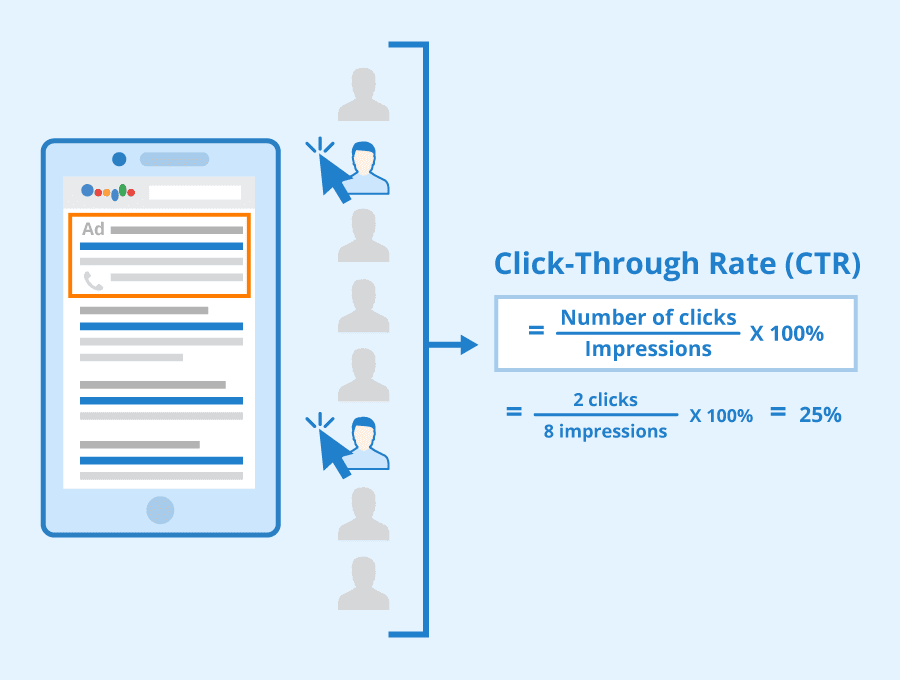
The Click-Through rate (CTR) for a link is a measure of how many people click on it after seeing it. There’s two sorts:
☐ SERP Click-Through Rate is the percentage of people who click on a website’s link after seeing it on the Search Engine Results Page (SERP). It’s an important SEO metric because it shows how well your Meta Tags attract clicks. See also: Meta Data
☐ On-Page CTR is about the percentage of users who click on a specific link or call to action within your website’s pages — moving from a blog to a product page, for instance.
How it’s calculated: Divide the number of clicks your link receives by the number of times it’s shown (impressions), then multiply by 100%. For example, if 1000 people see your link and 100 click on it, your CTR is 10% (a strong result on a SERP!)
Author: Seobility – License: CC BY-SA 4.0
DoFollow
DoFollow Links are links that search engines follow and factor into website rankings. They act as a signal of trust, passing authority (“link juice”) from the linking site to the linked site. By including Dofollow links to relevant, good-quality sites, you can potentially improve your own ranking. In short: they help webpages get noticed.
NoFollow Links, as you might imagine, do the opposite and work to prevent search engines from following and passing on trust and credibility. They’re often used in user-generated content (like in forums) to avoid unverified sources or spammy behaviour. See also: Robots.txt
Duplicate Content
When there are sections on your website that are the same (or very similar), this is Duplicate Content. It’s bad for SEO because search engines might struggle to figure out which page is the most important, leaving your website less likely to show up in search results.
Dwell Time
Dwell Time is the amount of time a user spends on a page after clicking through to it from search results. If someone clicks on your website and quickly leaves, that suggests the page might not have answered their question. But if they stay and read for a while, that suggests your content is useful and valuable. Modern search engines can use this info as a measure of how engaging and relevant your content is. See also: Bounce Rate
Evergreen Content
Content is “Evergreen” when it’s there for keeps, staying relevant and valuable over time. If you’ve created a comprensive tutorial or how-to guide, for instance, you’ll probably want that article to stay put. Evergreen content has the potential to attract organic traffic and strengthen SEO because search engines love informative, long-lasting content.
External Link
An External Link is like a bridge from your website to another website. It’s a way to help visitors find more useful information on other sites. External links are good for SEO, because when you link to other websites that are well-respected and relevant to your topic, search engines see this as a sign that your own website is also trustworthy. In SEO, “External Links” and “Outbound Links” are often used for the same thing.
What’s the difference between an External Link and an Outbound Link? It all comes down to ownership. Outbound links lead away from your web page to any other destination. External links are a type of outbound link that specifically point to websites owned by someone else. In short: all external links are outbound links, but not all outbound links are external!
Featured Snippet
Introduced to Google Search in 2014, a Featured Snippet is a special box that appears at the top of the search results, offering a quicker answer to the user’s question. It’s a direct excerpt from a relevant website, sometimes with an accompanying image or video.
Featured snippets offer a huge opportunity to get your website seen. If your content is well-structured and answers a search query clearly, you have a chance of being featured in that prime “position zero” spot even if you don’t rank first in the SERP results. See also: SERP
Google Analytics
Google Analytics is a powerful, free web analytics service courtesy of Google. It provides detailed insights into how visitors find and interact with your website. This includes information on website traffic, user behaviour, and conversion rates.
See also: Google Analytics — A Guide For Your Online Business
HTTPS
Have you ever noticed that little padlock icon when you go to a secure payment page? HTTPS is the secure version of the standard web protocol (HTTP), which uses SSL Certificates to establish a secure connection and verify a website owner’s identity.
Modern search engines now favour websites with an SSL Certificate (so using HTTPS) and give a ranking boost. This is because HTTPS provides a more secure and trustworthy user experience. By contrast, websites lacking an SSL Certificate are likely to appear further down the search ranking — or not show up in the search results at all.
Hyperlinks
Hyperlinks, the clickable text or images that take you to other webpages, are essential to navigating the web. Naked Links display the raw URL (like www.123-Reg.co.uk) without descriptive anchor text, it’s usually better to use meaningful anchor text. Needless to say, Broken Links can harm your SEO.
Internal Link
An Internal Link is one that connects one page of your website to another page on the same website. They help users easily explore your website and discover related content. Internal links add context for search engines, helping them understand the structure and hierarchy of your website.
When placed well, Internal Links give you “link juice” (authority) and can boost the ranking of important pages. See also: Backlink, Anchor Text, Link building
Image Optimisation
Optimising your images is key for on-page SEO. By choosing relevant images, compressing them for smaller file sizes, adding descriptive alt-text, and using clear file names, you’ll help pages load up faster. Search engines love fast websites — just like visitors do. See also: On-Page SEO
Indexing
Search engines “index” web pages from across the internet, just as a librarian indexes the books in a collection. They do this by sending out crawlers to discover new pages and “read” their content. When someone searches, the search engine looks through its index to find the most relevant pages, and this determines the pages that show up in search results. See also: Robots.txt
Keywords
An essential part of basic SEO, Keywords are words or phrases that describe the core topic and content of your web pages. They help both search engines and potential visitors understand what your website is about.
☐ Long-Tail keywords are longer, specific phrases that appear in your web content. So, where “Dorset Hotel” counts as a single broad keyword, for example, “Hotel with seaview in Dorset” is a long-tail keyword. Their specificity helps you target a niche audience and improve your search visibility. These phrases often come naturally in quality content, so no need to force it!
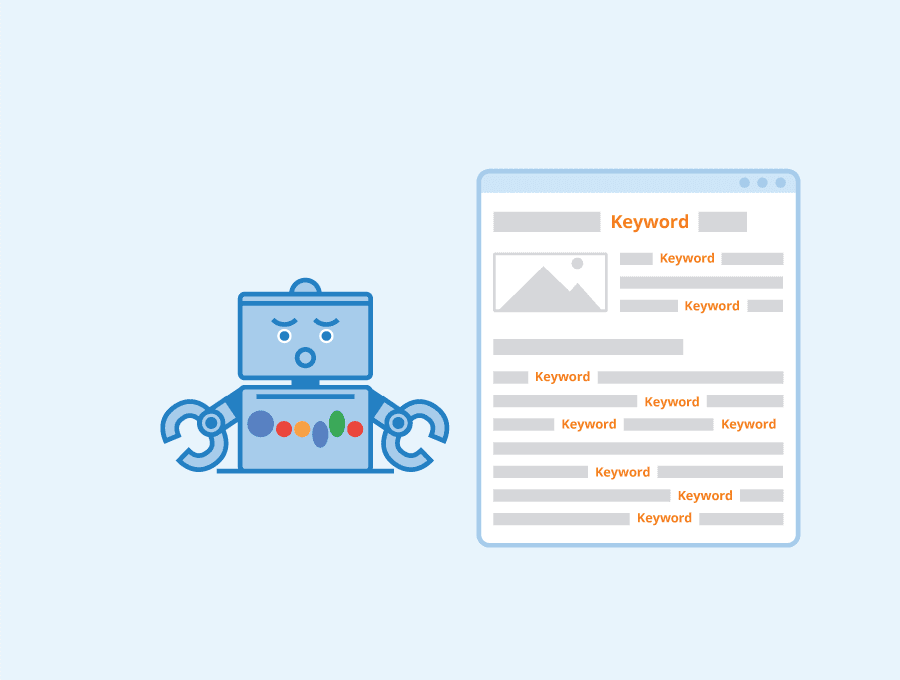
☐ Keyword Density refers to how often your keywords appear within your text. While keywords remain important for SEO, top quality content is always the most important thing.
Author: Seobility – License: CC BY-SA 4.0
But don’t overdo it! Squeezing as many keywords as possible into content is called Keyword Jamming. This might have fooled search engines a couple of decades ago, but it’s more likely to draw the wrong sort of attention today. Or no attention at all: Google might see this as naughty “Black Hat” SEO and remove you from the results entirely!
Keyword research tools like Google Keyword Planner, Moz, Ubersuggest, or SEMrush. They provide data on search volume, keyword difficulty, and related terms. Look for keywords with a balance between search volume and competition — and make sure they fit naturally within your content.
Local SEO
Local SEO is all about making your business easier to find online for people in your area. It helps you show up when they search for things like “restaurants near me” or “best pub in [your town]”. This includes things like claiming your Google Business Profile and getting listed in local directories. Local businesses can also benefit from using location-specific keywords.
That said, if you’re targeting the domestic market, or international customers, local keywords aren’t always the smartest option — though you might wish to think about creating sections or subpages on your website targeting different locations.
See also: Local SEO in 10 – How Do I Get My Business Found Online?
Long-Tail Keyword
Long-Tail Keywords are longer, specific phrases which can appear in your web content and boost your visibility in search engines. For more, see: Keywords
Link Building
Link Building is all about getting other websites to link back to your own. This might involve reaching out to other website owners, promoting your content on social media, or — ideally — publishing excellent quality content that others naturally want to link to.
Metadata
Metadata forms the label for your web pages, providing search engines and potential visitors with a quick summary of what they’ll find. In the context of websites, it refers to the various pieces of information embedded in the HTML code to describe the page’s content. Think of it as the blurb on the back of a book. When it comes to SEO, meta tags can significantly boost your visibility in search results, driving more traffic to your website. See next!
Meta Tags
Meta Tags are a specific type of metadata found within the <head> section of an HTML document. They provide structured information to search engines and browsers. There are two main types:
☐ Meta Title: The clickable title of your webpage that appears in search results and on the browser tab. The ideal meta title length is around 50-60 characters (usually one or two sentences), so that the whole thing can be displayed without being cut off.
For example: “SEO A-Z: The Essential SEO Guide | 123 Reg”
☐ Meta Description: a brief summary of the website, or a particular website page, contained in the title in search results, and enticing users to click. The Meta Description can be longer than the Meta Title, but typically under 160 characters to stay visible on search engine results pages (SERP).
For example: “Master SEO with our complete A-Z glossary and improve your search engine ranking!”
See also: A Beginner’s Guide to Crafting Title Tags and Meta Descriptions that Get Clicks
Mobile Friendliness
Most of us spend more time online on our smartphones than on desktops these days. With smart use of ‘Responsive Design’, websites can change their layout to suit different screen sizes. This is important for SEO because Google now prioritises mobile-friendly sites in search rankings. See also: On-Page SEO
No Follow
A type of link you can choose if you don’t want to pass on authority (“link juice”) to another website. See: Do Follow
On-Page SEO
On-Page SEO is all the things you can tweak directly on individual web pages to improve search engine rankings. This includes your content and keywords, but especially making sure your website loads quickly and looks good across all devices, in a way that keeps both users and search engines happy.
Organic Traffic
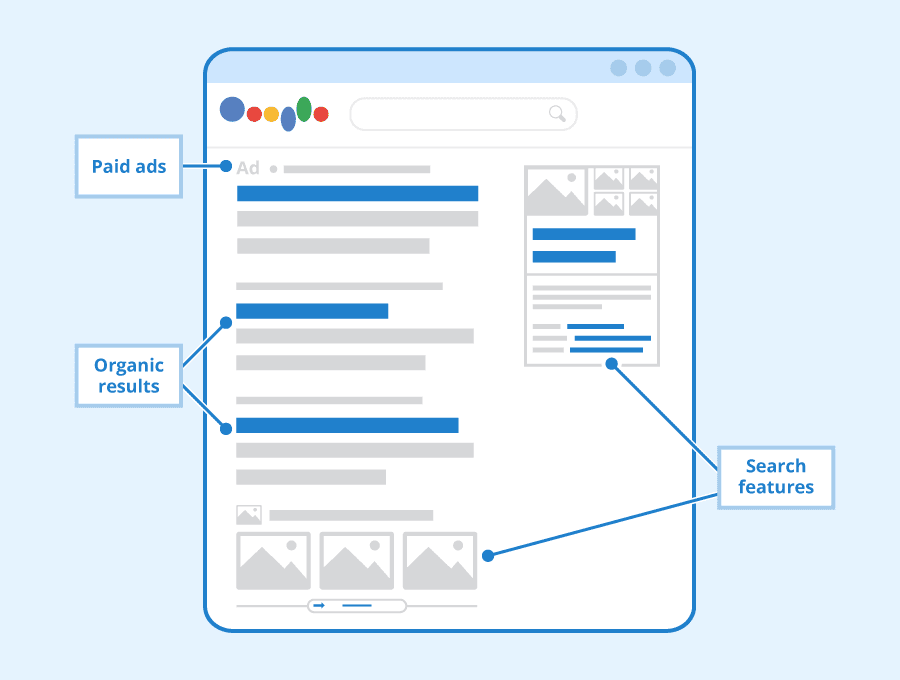
Organic Traffic refers to visitors who’ve found your website “naturally” through search engine results, rather than clicking on paid ads. That is: they’ve searched for something related to your content, and your website has appeared in the results because of its relevance and authority. Organic traffic is valuable because it shows people are actively seeking out the type of info or products you offer.
See also: How to make your organic listing stand out in the SERPs
Orphan Pages
Orphan Pages are those tucked away on your website with no other pages linking to them. This isn’t always a problem, but visitors and search engines might have a hard time finding pages, even when the content wants and deserves to be seen. To fix this, you’ll want to add internal links and include the page in your navigation.
Page Value
Shown as a cash sum, Page Value is a metric of how much revenue a page on your website contributes to overall sales. Imagine, for example, your recent blog post has been visited by 100 people, and this leads to one £10 sale on your product page. In that case, the Page Value would be a princely £0.10. For those working in content creation (eg., blogging), strong Page Value can be a good stat to show to your boss!
Permalinks
An “always there” web address for individual pages or posts on your website; the content might change, but the Permalink stays the same. Clear and descriptive Permalinks help humans and search engines understand what your pages are about.
While it’s generally best to be specific, there are times when it’s better to keep Permalinks broad. This might be the case for regularly updated content or topics with an uncertain future. For example, you might not want to put “2024” into an annual best-of list that’s updated every year. See also: Evergreen Content
Pogo Sticking
Less fun than literally, Pogo Sticking is a way to describe users quickly bouncing between search results — clicking on a website only to immediately return to the search engine to try a different one. See also: Bounce Rate
PPC
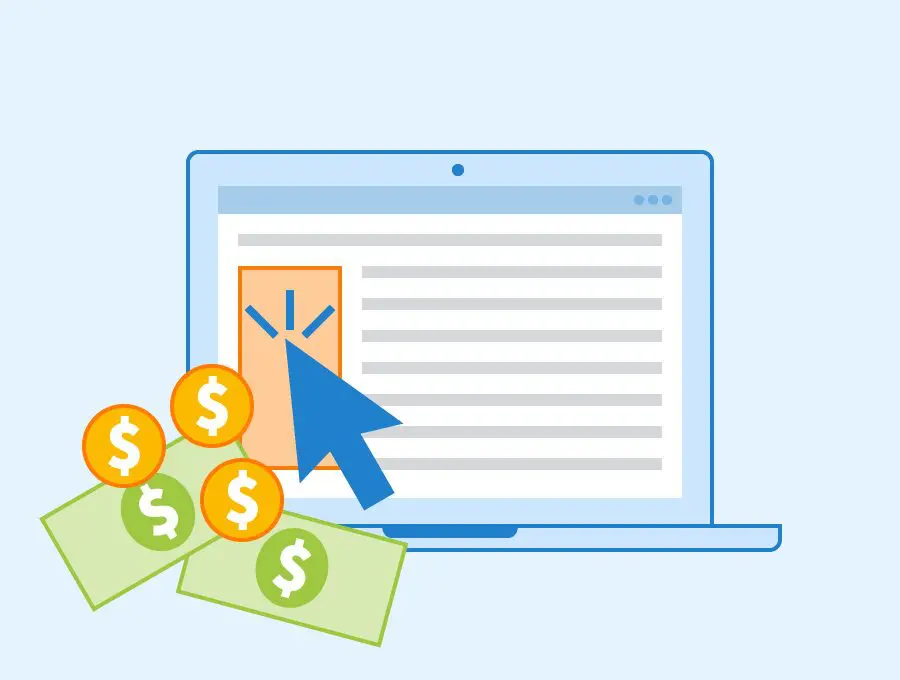
When it comes to search engines, Pay-Per-Click (PPC) is when you pay for your website to appear at the top of the search results. Such listings usually show up as “Sponsored” or “Ad” to distinguish them from the organic results. PPC can be a way to gain visibility quick when there’s so much competition out there.
Author: Seobility – License: CC BY-SA 4.0
Quality Content
Quality Content is the holy grail. Fresh and original work will get your website noticed organically — earning trust and authority with users and search engines alike. Inform, educate, entertain.
But what makes content stand out? Why isn’t that brilliant article I posted getting any hits? It’s a million dollar question. What resonates with one person might not with another. Just focus on creating great content that people love and the organic SEO benefits usually follow.
Ranking
In the context of SEO, Rank or Ranking refers to the position your website holds in search engine results pages (SERPs) for specific keywords or search queries. Fun fact: 75% of searchers never look beyond the first page of results. See also: SERP
Redirect
Redirects are instructions that tell both web browsers and search engines to automatically forward users from one URL to another. When you change a page’s URL, redirects see to it that any backlinks pointing to the old address still pass value (“link juice”) to their new location — but always keep it relevant to the original link.
Specifically, a “301 Redirect” is for a permanent move and helps keep your search rankings. A “302 Redirect” is temporary and doesn’t pass on SEO value in the same way. On platforms like Managed WordPress, you can set these up easily using plugins or within SEO tools.
Robots.txt
Robots.txt is a tiny file with a set of instructions for search engine crawlers (the bots that explore websites), telling them which bits of your website they can visit and which are off-limits.
For more info, check out: What’s Robots.txt and How Do I Optimise it for WordPress?
SERP
SERP stands for Search Engine Results Page – that list of results you see after typing something into Google or another search engine. In essence, this is what SEO is all about: your goal is to rank top or very near the top for relevant searches. This gives you more online visibility, attracting potential customers, readers, or fans to your website — ultimately helping you achieve your online objectives.
Author: Seobility – License: CC BY-SA 4.0
Site Speed
How fast your site loads up and responds is important for user experience. Nowadays, it’s also factored in by modern search engines. See also: On-Page SEO
SSL Certificate
Websites with SSL certificates are more trustworthy and secure. That helps them rank higher in search results. See also: HTTPS
For more, check out: 7 Reasons Why SSL Certificates are Essential for Websites
Traffic
The number of people who visit. Traffic refers to the number of people who visit your website. It’s a crucial metric for measuring the success of your online presence. Traffic can arrive in all sorts of ways:
☐ Organic Traffic: Visitors who discover your website through search engine results.
☐ Direct Traffic: People who type your website’s address directly into their browser or access it via a bookmark.
☐ Referral Traffic: Visitors who arrive from links on other websites.
☐ Paid Traffic: Visitors who arrive through paid advertisements, such as Pay-Per-Click (PPC) ads.
Topical Authority
The level of expertise and credibility a website holds for a topic or subject area. Search engines like Google use a complex set of factors to assess a website’s authority on a topic.
Unique Visitors
Unique Visitors represent the number of individual people who visit a website during a specific period, typically measured by IP addresses or browser cookies.
URL
A unique address that identifies and locates a page or file on the internet. URLs (Uniform Resource Locators) are the backbone of a website’s structure and the starting point for search engines. While a domain name is the memorable web address (like 123-reg.co.uk) that points to a website, the URL is the full web address.
That includes the domain name plus extra details like the protocol (http/https) and the path to specific pages or files (e.g., https://123-reg.co.uk/blog/). Using clear, concise, and descriptive URLs with relevant keywords can improve organic traffic and visibility.
See also: Domains That Click — How to Choose the Right Domain Name
White Hat SEO
SEO is “White Hat” when it adheres to search engine guidelines. By contrast, “Black Hat” SEO what it’s called when naughty people use deceptive techniques to manipulate rankings. Luckily, search engines like Google and Bing are sophisticated when it comes to ratting out most Black Hat SEO, and if spotted you might lose your rank entirely.
XML Sitemap
The XML Sitemap is a file that lists all the pages and content on your website, the purpose being to make it easy for search engines to crawl (search around) and index the pages within. The technical aspects of creating and maintaining an XML Sitemap are usually handled by web devs or SEO specialists. Most website owners don’t need to use it directly, as content management systems like WordPress tend to sort it out for you.
Zero Click Search
When a user manages to get all the information they need directly from the search results page (SERP) without actually going to click the link, that’s a Zero-Click Search. It can happen when popular websites give nice instant answers to questions. That’s no bad thing. However, it does mean you’ve missed a click. This could even be the accidental result of showing in a Featured Snippet. See also: Featured Snippets