

So, you’ve got yourself a domain name? Brilliant! You’re now one step closer to building your brand online — be that to show off your skills as a freelancer or to sell your products and services as a small business.
From here, getting your website live really isn’t as tricky or as time-consuming as you might think. Let’s take a look at what comes next.
From domain to website
Buying a domain name is the first step toward building your brand online, not the finish line. Now it’s yours, you’ve got real flexibility over what happens next.
You can start simple with a one-page site, build a full website, or set up an online shop when you’re ready to sell. There’s no single “right” way to do this, and you can always start small and grow into it as your business does.
For most people, that next step means building a website, so let’s focus on how to actually get one live.
No domain yet?
No problem, that’s easy! Just pop your business name or a keyword into the search bar below and we’ll show you what’s available, plus some other great options if your first choice is taken.
Three ways to build your site
Depending on your skills, budget and how hands-on you want to be, you’ve got a few options for taking your new domain live:
1. Choose Website Builder
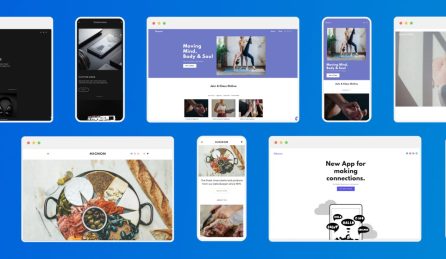
Honestly, this is the option many small businesses and freelancers go for, and it’s easy to see why. Just pick a template you like, customise it with your own words and images, and publish it in a few clicks.
With 123 Reg Website Builder there’s no coding, no tech setup, and nothing to configure in the background. It’s genuinely as simple as choosing a design, making it yours, and going live. Every template is fully responsive too, so your site will look great whether someone’s viewing it on a phone, tablet or desktop.
When you register a domain name with 123 Reg, Website Builder also lets you get started with a free one-page “Coming Soon” site. Businesses worldwide have used pages like this for years to let their audience know they’ll be online soon and build a bit of buzz while they wait, so it’s a good way to make your domain feel “live” from day one.

When you are ready for the full build, it’s worth thinking about your site’s structure and what pages you’ll want. For a simple business site, you might only need:
✓ Your homepage is your shop window online. First impressions matter, so sum up who you are and what you do.
✓ About/Company info pages tell your story. Customers like to know who they’re buying from.
✓ A Contact page make it easy to reach you, whether that’s a form, email, phone number or map.
✓ News or blogs share updates and useful content, and give search engines fresh reasons to find you.
If you’re planning to sell online, our Online Store Builder gives you everything a standard website builder offers, plus the tools you need to sell products and take payments worldwide, all just as easy to set up.
See also: How to Make a Website with Website Builder and How Can I Make an E-commerce Website?
2. Choose Managed WordPress Hosting
WordPress is one of the most popular tools in the world for building websites, blogs and online shops, and for good reason. It’s free to use and incredibly flexible, letting your site grow and evolve as your business does, whether that’s adding new pages, running a blog, or building out a full online shop down the line.
You don’t need to be technical to use it, either. With 123 Reg Managed WordPress Hosting, all the fiddly setup (updates, backups, security) is handled for you in the background, so you can focus on the part that matters most: building your site and creating content.
Thousands of plugins and themes are also available, so you can add extra features, like booking forms or membership areas, as your business needs grow.

WordPress is a great choice for businesses that want more flexibility than a standard website builder offers, without having to deal with the technical side themselves.
See also: What is WordPress and Why Should You Use It?
Hosting, explained simply
Think of hosting as the home for your website. It’s the server space that that stores all your files and serves them up to visitors the moment they type in your web address. Without it, your site can’t go live.
Your server keeps your site online 24/7. That’s why a trusted host matters like 123 Reg matters. You’ll also want good hosting performance to improve your website’s speed. That’s good for business because faster pages keep visitors around longer, and make it easier for them to buy from you.
For more, check out: What is Web Hosting?
3. Choose Web Hosting (build it your own way)
If you’re more technical, choosing a 123 Reg Web Hosting gives you a blank canvas to build on. You can choose your own Content Management System (CMS), like WordPress or Adobe Commerce or another platform you prefer, or build from scratch using your own tools and code. If you need more power behind your site, Premium Hosting steps things up with extra performance and resources as your site grows.
This gives you complete control, but it’s best suited to those who are confident with the technical side, so we won’t go into detail here.
For more, check out: Website Builder vs Web Hosting
Set up professional email
A professional email address that matches your domain is one of the easiest ways to look instantly more credible. Still sending invoices from an old Yahoo or Gmail address? It’s time to upgrade.
An email like hello@yourbusiness.co.uk does more than just look the part, it builds trust the moment someone sees it land in their inbox. Customers take you more seriously, suppliers treat you as an established business, and you come across as far more professional than a free, generic address ever could.
It’s also just better for you day to day. You get more storage, stronger spam and security protection, and the ability to create separate addresses for different purposes (like sales@ or support@) so you can stay organised as your business grows.

You can buy professional email on its own, or get it included free with Website Builder and most hosting plans, so there’s really no reason not to make the switch!
If you want more than just email, Microsoft 365 gives you a professional inbox on your own domain, plus the full set of Microsoft apps you already know (Word, Excel, PowerPoint, Teams), with built-in AI tools like Copilot to help you work faster.
See also: Why Every Business Needs a Professional Email Address and M365 Add-Ons to Power Your Small Business
Keep the momentum going
Getting your website live is just the start. Here’s what to do next:
☐ Optimise for search engines so people can find you.
☐ Make sure you set up a Google Business Profile so customers can more easily find you online — and on Google Maps.
☐ Connect your social media accounts to your site, and vice versa. If you’ve already built a following on Facebook or Instagram, linking everything together keeps your branding consistent and helps customers find you wherever they’re looking.
☐ Start a blog to build your reputation and share useful content.
☐ Consider using pay-per-click (PPC) ads to drive more traffic. Check out our guide to the biggest ads platform, Google Ads.
☐ If you’re looking for more data about your performance, set up Google Analytics to see how your site’s doing.
See also: Social Media and Your Website – Why Small Businesses Need Both to Grow
When to register your business
You don’t need to officially register your business to choose a brand name, grab your domain, or get your website live. Once you actually start trading, though, it’s worth sorting out your business structure, sole trader or limited company, since it affects things like tax and how your name is protected.
To learn more, check out: Business Starter: Sole Trader or Limited Company — Which Should You Choose?
Not ready to build just yet?
If you’re not ready to build yet, here are a few other ways to make the most of your domain in the meantime.
☐ Park it
Parking your domain simply means holding onto it without attaching a website yet. It stays registered in your name, so no one else can snap it up while you take your time deciding on next steps. It’s a good option if you’ve got the perfect name locked in but aren’t quite ready to build.
For more, see: What is Domain Parking?
☐ Redirect it
Redirecting means sending visitors from one domain to another, so if someone types in a domain you own but aren’t using as your main site, they’ll land on your website instead.
With over 400+ domain extensions available at 123 Reg, you can pick up a few different endings for your name, like .com and .co.uk. Redirecting these to your main site is a great way to protect your brand and send more visitors to where you want them to land.
When it comes to setting up a professional email address, it’s best to choose one favoured domain ending and stick with it. Having a single, consistent domain across your website, email and marketing makes your business easier to remember and looks more professional, so save the extra extensions for redirects rather than splitting your brand across several.
See also: What is Domain Forwarding?
☐ Sell it
If you no longer need a domain, or bought it with resale in mind, you can sell it on. Domain names can hold real value, especially if they’re short, memorable, or in demand, so it’s worth checking what yours could be worth before letting it go.
For more, see: How to Sell a Domain Name
Wrap up
Getting online doesn’t have to be a headache. Whether you’re launching a full website with Website Builder, easing in with WordPress, setting up a professional email address, or simply parking your domain until you’re ready, there’s an option to suit wherever you’re at.
Take it one step at a time, and don’t feel like you need to have it all figured out from day one. Before you know it, you’ll have a site (and a brand) that’s ready to show up online and help people find you.

Get online in minutes with 123 Reg Website Builder
FAQ
What happens if I forget to renew my domain?
If your domain expires, your website and email could stop working, and there’s a risk someone else could snap it up. The easiest fix is to switch on auto-renew when you register, that way it’s one less thing to remember.
Do I need to know how to code to build a website?
Not at all. Tools like Website Builder are designed for exactly this, no coding needed. Just pick a template, add your own words and photos, and publish. If you want a bit more flexibility down the line, WordPress is also beginner-friendly and doesn’t require coding either.
How long does it take to get a website live?
Less time than you’d think. With a website builder, you could realistically have a simple site live within an afternoon. Even a slightly more involved site with several pages can usually be up and running within a few days.
I don’t want to use my domain yet. What can I do with my domain in the meantime?
That’s completely fine, there’s no rush. You can simply “park” your domain until you’re ready. Set up a free one-page “Coming Soon” site to hold your spot and start building buzz, or set up email forwarding so you can start using a professional-looking email address on your domain straight away, even before your full site is live.
Do I need a privacy policy or cookie notice on my website?
Yes, if you’re collecting any personal data (even just through a contact form), you’ll need a privacy policy, and if you’re using cookies (most sites do), a cookie notice too. It’s a legal requirement in the UK, and it also helps build trust with your visitors. Most website builders make this easy to add.
How do I know if my business name is already trademarked?
It’s worth doing a quick check before you build your whole brand around a name. You can search the UK Intellectual Property Office’s trademark register for free. It’s a good habit to do this alongside registering your domain and business, just to make sure you’re building on solid ground.